How to Expertly Manage Multiple TikTok Accounts: 2026 Guide

文章目录
- Does tiktok allow multiple accounts?
- Challenges of managing multiple tiktok accounts
- What is a tiktok shadowban?
- Why tiktok links multiple accounts
- Why people run multiple tiktok accounts
- How geelark helps manage multiple tiktok accounts
- Step-by-step: managing tiktok accounts with geelark
- Step 1: create a cloud phone profile
- Step 2: assign a unique proxy
- Step 3: configure device information
- Step 4: launch and manage profiles
- Automating tiktok account operations
- Frequently asked questions
- Can you create multiple tiktok accounts with the same email?
- Can i have two or more tiktok accounts?
- What causes tiktok account suspension?
Are you worried about getting banned for running multiple TikTok accounts? This is a common concern for creators, agencies, and social media managers who need to operate more than one profile.
The real challenge isn’t how to manage multiple accounts—it’s how to keep them safe. If your accounts get linked and suspended, management becomes impossible. That’s why relying solely on TikTok’s built-in account switcher can be risky.
In this guide, you’ll learn a professional approach that keeps each TikTok account isolated, secure, and scalable.
Does TikTok Allow Multiple Accounts?
Yes, TikTok allows users to have multiple accounts. Its built-in account switcher helps creators and businesses manage different profiles on a single device.
However, there are limits. Most users can manage only 3–6 accounts per device before issues arise. Each account must also be registered with a unique email address or phone number.
Challenges of Managing Multiple TikTok Accounts
- Account association: If one account is flagged, others using the same IP or device may also be affected.
- Device limits: Managing many accounts on one phone increases detection risk.
- IP quality: Shared or datacenter IPs are easier for TikTok to detect.
In most cases, TikTok applies shadowbans rather than outright bans—but the impact on reach and growth can be severe.
What Is a TikTok Shadowban?
A shadowban limits your content’s visibility without notifying you. Your videos may still be visible to followers, but they won’t appear on the For You page.
- Sudden drop in views and likes
- No appearance on the For You page
- Hashtags stop driving traffic
- Follower growth stalls or declines
Why TikTok Links Multiple Accounts
TikTok uses multiple signals to identify related accounts:
- IP address tracking: Multiple logins from the same network raise red flags.
- Device fingerprinting: Hardware and system details link accounts together.
- Behavior analysis: Repetitive or bot-like actions trigger detection.
Why People Run Multiple TikTok Accounts
- Separating personal and business identities
- Managing multiple brands or clients
- Targeting different niches or regions
- Running multiple TikTok Shop stores
How GeeLark Helps Manage Multiple TikTok Accounts
GeeLark uses cloud phone technology to give each TikTok account its own isolated Android device and IP address. Even though you control everything from one dashboard, each profile operates independently.
This makes every account appear as a unique real user to TikTok, dramatically reducing the risk of bans or shadowbans.
Step-by-Step: Managing TikTok Accounts with GeeLark
Step 1: Create a Cloud Phone Profile
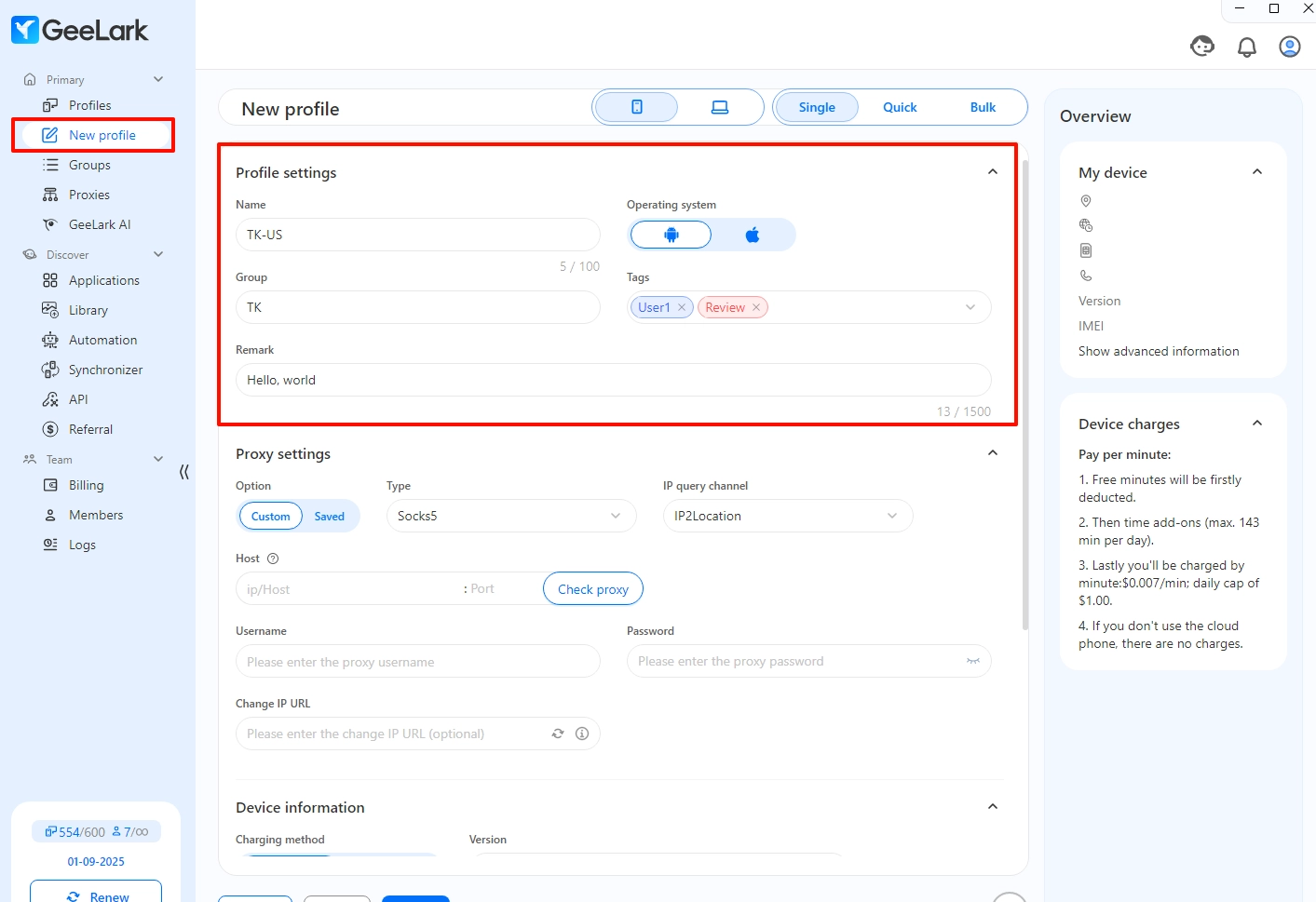
Each profile acts as a separate Android device. You can name profiles based on account purpose or region.
Step 2: Assign a Unique Proxy
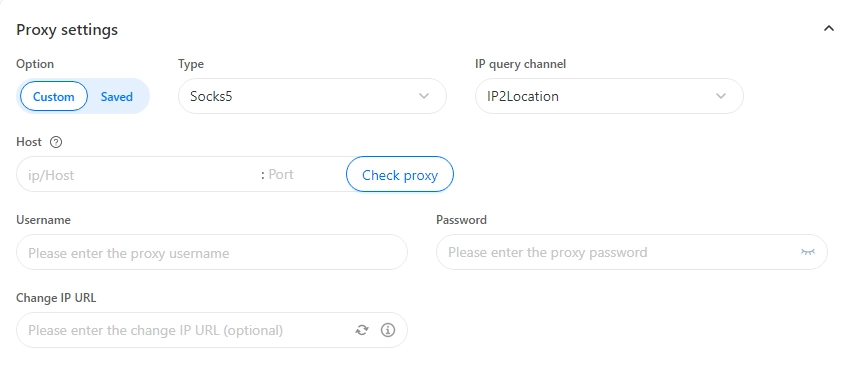
Using a dedicated proxy for each profile helps accounts appear from different locations, preventing linkage.
Step 3: Configure Device Information
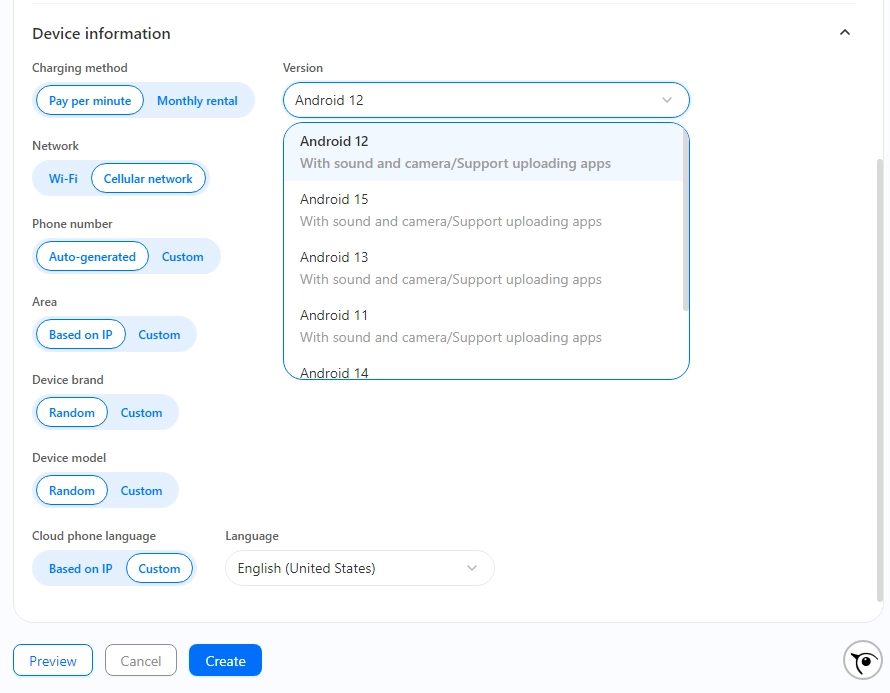
Set Android versions, device brands, language, and timezone. Using varied device settings adds another layer of realism.
Step 4: Launch and Manage Profiles
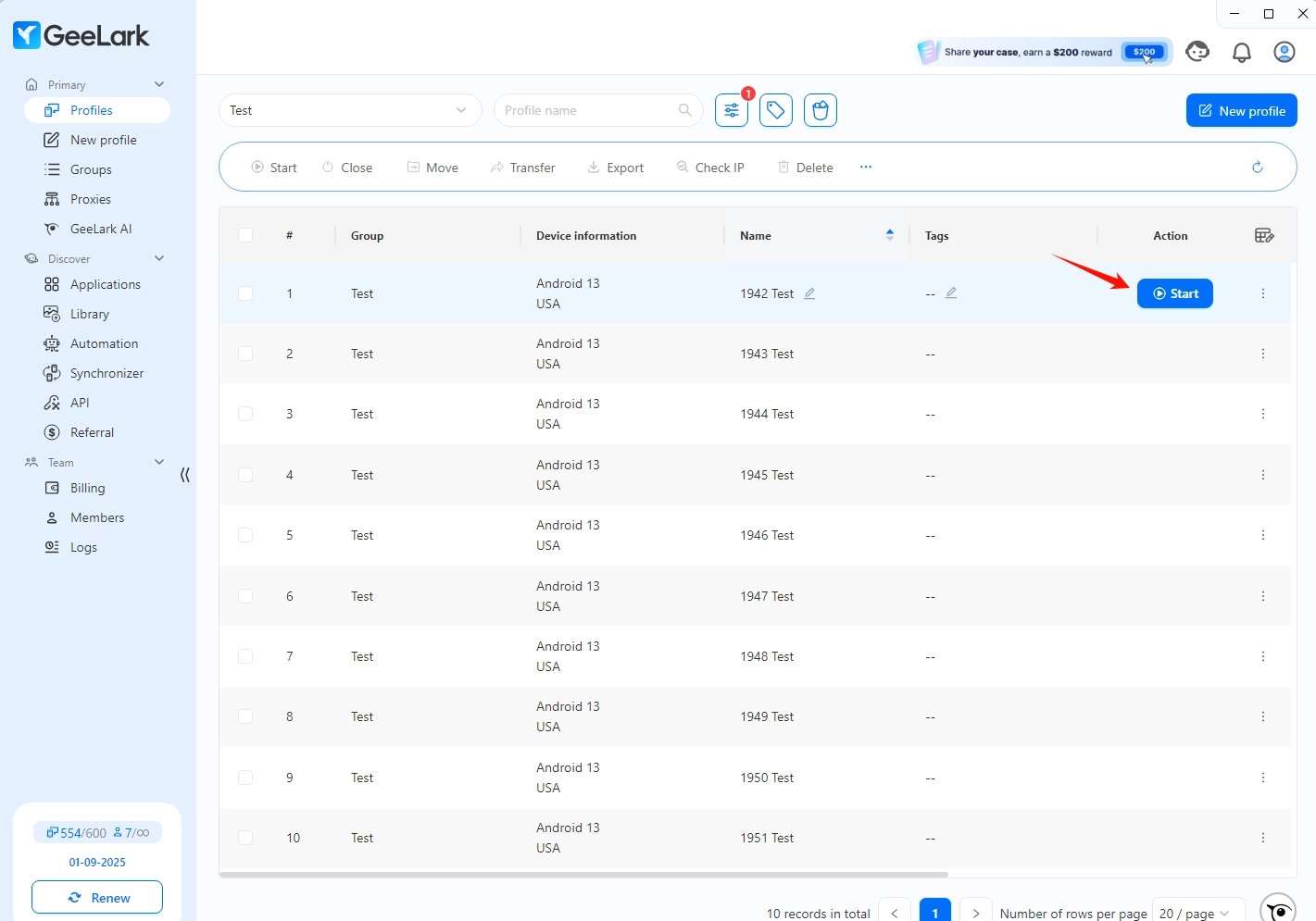
Once launched, each cloud phone works like a real Android device. You can manage dozens or even hundreds of TikTok accounts from one computer.
Automating TikTok Account Operations
GeeLark also offers automation templates for repetitive tasks such as account warm-up and content posting.
For example, an AI warmup template can simulate human behavior by scrolling, watching videos, and interacting naturally—helping new accounts build a realistic activity history.
Frequently Asked Questions
Can you create multiple TikTok accounts with the same email?
No. Each TikTok account must use a unique email address or phone number.
Can I have two or more TikTok accounts?
Yes. For casual use, TikTok’s account switcher may be sufficient. For business or commercial use, isolated cloud phones like GeeLark are strongly recommended.
What causes TikTok account suspension?
Common causes include policy violations, copyright issues, spam-like behavior, or linking multiple accounts to the same device or IP address.