How to Set Up Automatic Mobile Proxy Rotation for Marketplace Scraping: A Step‑by‑Step Guide
文章目录
- Introduction
- Pre-flight checklist
- Key concepts
- Step 1: choose and prepare a mobile proxy provider
- Step 2: configure the rotation interval and trigger ip changes via api
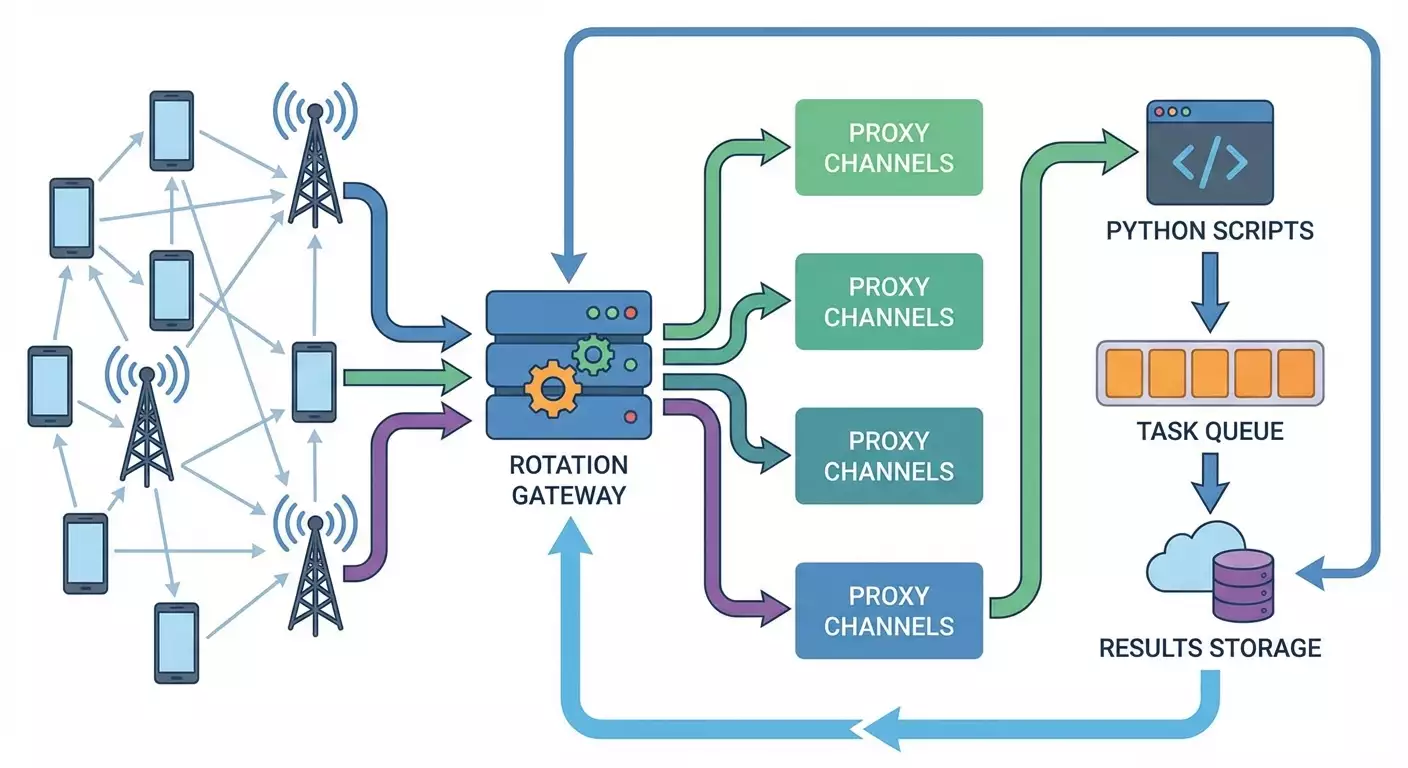
- Step 3: build a local rotation gateway and routing rules
- Step 4: integrate proxy rotation in python scripts (requests)
- Step 5: async data collection and task queue (aiohttp)
- Step 6: collect marketplace data correctly and ethically
- Step 7: scheduling, background runs, and monitoring
- Step 8: result storage, deduplication, and retries
- Step 9: security, privacy, and rollbacks
- Validation
- Common pitfalls and fixes
- Bonus: power features
- Faq
- Conclusion
Introduction
In this step-by-step guide, you’ll learn how to set up automatic rotation of mobile proxies for robust, compliant collection of public marketplace data. You’ll see how to pick a safe rotation interval, trigger IP changes via your provider’s API, integrate rotation into your Python scripts, and test and monitor the process. We’ll go from zero to a working pipeline: from purchasing proxies and preparing your environment to a production-ready flow with logging, retries, job queues, and safe settings. A key part of the guide covers practical Python integration (requests and aiohttp) and solid engineering practices: pipeline design, fault handling, rate limiting, and data quality checks.
This guide is beginner-friendly with advanced sections for power users. If you’ve never configured proxies or written bots, follow the steps in order. If you’re an experienced developer, jump into the advanced bits: queue optimization, async, rotation strategies, and monitoring.
What you should know beforehand: basic command-line skills, how to run Python scripts and install packages, and a general sense of HTTP requests and headers. That’s enough. You’ll pick up the rest as you go.
Time required: 3–6 hours for full setup and verification. If you already have mobile proxies and Python installed, you’ll likely finish faster.
⚠️ Important: Before you start, make sure you comply with local laws and each site’s terms. Your data collection must be legal, ethical, and consistent with website policies. Use official APIs and open datasets whenever possible. If a site explicitly forbids automated collection, do not bypass those restrictions.
Pre-flight checklist
Tools and access you’ll need: an account with a mobile proxy provider that supports an IP rotation API, a machine to run scripts (local computer, VPS, or cloud server), Python 3.10+ with pip, and a text editor or IDE. A logging/monitoring account is optional but recommended.
System requirements: 1 CPU and 1–2 GB RAM are enough for a small project. For async scraping with dozens of concurrent tasks, plan for 2–4 GB RAM. Keep at least 5 GB of free disk space for logs and temp files. A stable 10 Mbps+ internet connection.
What to install and configure: Python 3.10+, pip, and a venv. Install requests, aiohttp, httpx (optional), tenacity for retries, pydantic for settings validation, schedule or apscheduler for scheduling, and uvloop (Linux/Mac) for faster async. Make sure you have a token or login/password for your mobile proxy and for the rotation API.
Backups: if you’re changing a production setup, back up configs and keys. Store tokens securely. Keep your .env file and its backup in encrypted storage. In production, enable log rotation so you don’t lose event history.
Tip: Store sensitive data (login, password, API tokens) in .env and don’t commit that file. Use environment variables for server-side configuration.
Key concepts
Plain-English terms: a mobile proxy is an intermediary that routes your requests through a cellular operator’s IP address. Rotation means regularly changing the exit IP (e.g., every 2–10 minutes or on an API call). A sticky session is a mode where multiple requests share the same IP for a while, emulating a real user. A rotation gateway is a local or remote component that decides which proxy/channel to use for each request and when to change the IP.
How it works in practice: to reliably collect public data, control your request rate, headers (User-Agent, Accept-Language), session behavior (cookies), and IP rotation cadence. Don’t try to “break” site defenses. Respect rate limits, use caching, add pauses, and read official docs. If a site offers an open API or exports, that’s your best path.
What to keep in mind: mobile IPs can look “natural” in some scenarios, but excessive activity or repetitive request patterns can still trigger blocks or CAPTCHAs. Rotation isn’t a magic button. Proper headers, pacing, queueing, and retries matter just as much as changing IPs.
Tip: Start with a low request rate and increase gradually while watching error metrics. That’s how you’ll find a safe, stable operating point.
Step 1: Choose and prepare a mobile proxy provider
Goal
Select a mobile proxy provider with an IP rotation API and obtain access parameters for automated rotation.
Step-by-step
- Create an account with a mobile proxy provider. Confirm they support an IP rotation API and sticky sessions.
- Pick a type: shared, private, or a dedicated channel. For stability, choose a dedicated channel or a private pool.
- Decide on IP geography: select a country and region if location affects your results.
- Check authentication options: username/password or IP allowlist. Configure what’s most convenient and secure.
- Find the API section in the dashboard. Ensure there’s an operation to change IP on demand (for example, GET /change-ip or POST /rotate).
- Save the essentials: proxy address (host:port), username/password (if required), the rotation URL, API token/key, and rotation limits (e.g., no more than once every 2 minutes).
- Run a manual test: connect via browser or curl over the proxy and confirm you see a mobile external IP.
What to watch out for
Check SLA and support: make sure the provider offers uptime guarantees and responsive support. Review IP change limits and allowed traffic patterns.
Tip: On a tight budget, start with 1–2 channels and refine your architecture. Scale later by adding channels and load balancing.
Outcome
You have working access to a mobile proxy and the IP rotation API, and you understand the limits and terms.
Potential issues and fixes
- Cannot connect to the proxy: verify username/password, IP allowlist, and the correct port.
- Rotation API doesn’t respond: check the token and request format; ensure you’re not hitting rate limits.
- Rotation too infrequent: review your plan—maybe you need a tier with a higher rotation frequency.
✅ Check: Run curl over the proxy and confirm the external IP differs from yours. Then trigger the rotation API and repeat curl—your external IP should change.
Step 2: Configure the rotation interval and trigger IP changes via API
Goal
Choose a safe rotation interval, automate API calls to change IPs, and prepare a one-liner for manual control.
Step-by-step
- Pick a baseline interval: for mobile proxies, 2–10 minutes is common. Start with 5 minutes as a balance between session stability and freshness.
- Double-check API limits with your provider (e.g., no more than one change every 2 minutes). Set your interval at or above that limit plus a 20–30% safety margin.
- Form your API URL, e.g., https://api.example/rotate?token=YOUR_TOKEN or a POST with body {"token":"YOUR_TOKEN"}. Save the command somewhere handy.
- Test from the command line with curl. Example: curl -X GET "https://api.example/rotate?token=YOUR_TOKEN". Confirm the response indicates success.
- Create a local wrapper script to rotate IPs—rotate_ip.sh or rotate_ip.py—that calls the API and logs results with timestamps.
- Set up a scheduler: cron on Linux or a cross-platform Python scheduler like schedule or apscheduler. Run every 5 minutes to start.
- Add random jitter (±15–30 seconds) so calls don’t land on exact clock ticks. It looks more natural and reduces timing collisions.
Command and code samples
curl GET: curl -s "https://api.example/rotate?token=YOUR_TOKEN"
curl POST: curl -s -X POST -H "Content-Type: application/json" -d '{"token":"YOUR_TOKEN"}' https://api.example/rotate
Python rotate_ip.py: import os, time, json, random, requests; TOKEN=os.getenv("PROXY_TOKEN"); URL=f"https://api.example/rotate?token={TOKEN}"; def rotate(): r=requests.get(URL, timeout=20); print(time.strftime("%Y-%m-%d %H:%M:%S"), r.status_code, r.text); if __name__=="__main__": while True: try: rotate() except Exception as e: print("rotate_error", e); time.sleep(300+random.randint(-30,30))
What to watch out for
Log every IP change: it’s invaluable for debugging and incident review. Save status, response body, and the new external IP after each change.
Tip: If your provider supports forced rotation by a unique channel ID, use it. It’s more convenient than a shared token when managing multiple channels.
Outcome
You have automatic IP changes running at a safe interval with logging. You can also trigger manual changes with a single command.
Potential issues and fixes
- 429 Too Many Requests: increase the interval and add jitter. Check your plan’s rate limits.
- Timeouts: increase the timeout and verify network stability. Contact support if failures persist.
- Rotation doesn’t yield a new IP: account for pool specifics, wait 1–2 minutes, then retry.
✅ Check: In 15–20 minutes, you should see 3–4 successful IP changes in your logs. Compare the IP before and after each change.
Step 3: Build a local rotation gateway and routing rules
Goal
Create a simple local layer that serves proxy settings to your scripts and manages sticky sessions and fallback logic.
Step-by-step
- Create config.json with your channels: address, port, auth, rotation URL, and a minimum interval between rotations.
- Implement proxy_manager.py to load config, track the last rotation time, trigger rotation when needed, and provide current proxy settings.
- Add sticky sessions: return the same proxy for a given domain or task for a defined TTL (e.g., 5–10 minutes) so you don’t switch IP mid-session.
- Add a pool of user-agent strings and Accept-Language values and rotate them sensibly. Store them in JSON for easy updates.
- Expose a simple local REST endpoint using FastAPI or http.server, so other scripts can GET /proxy for settings and POST /rotate to force a change.
- Write logs to proxy_manager.log and track metrics: number of rotations, average response time, rotation errors.
Code sample
config.json structure: {"channels":[{"name":"mob1","proxy":"host1:port","auth":{"user":"u","pass":"p"},"rotate_url":"https://api.example/rotate?token=AAA","min_interval_sec":180},{"name":"mob2","proxy":"host2:port","auth":{"user":"u2","pass":"p2"},"rotate_url":"https://api.example/rotate?token=BBB","min_interval_sec":300}],"sticky_ttl_sec":600}
proxy_manager.py (simplified): import time, json, random, threading, requests; from http.server import BaseHTTPRequestHandler, HTTPServer; cfg=json.load(open("config.json")); state={"last_rotate":{}}; def need_rotate(ch): t=time.time(); last=state["last_rotate"].get(ch["name"],0); return t-last>ch["min_interval_sec"]; def rotate(ch): try: r=requests.get(ch["rotate_url"], timeout=20); state["last_rotate"][ch["name"]] = time.time(); return True, r.text except Exception as e: return False, str(e) def get_proxy(): ch=random.choice(cfg["channels"]); return ch class H(BaseHTTPRequestHandler): def do_GET(self): if self.path=="/proxy": ch=get_proxy(); auth=f"{ch['auth']['user']}:{ch['auth']['pass']}@" if ch.get("auth") else ""; self.send_response(200); self.end_headers(); self.wfile.write(json.dumps({"http":"http://"+auth+ch["proxy"],"https":"http://"+auth+ch["proxy"]}).encode()); else: self.send_response(404); self.end_headers() def do_POST(self): if self.path=="/rotate": ok,msg=rotate(get_proxy()); self.send_response(200 if ok else 500); self.end_headers(); self.wfile.write(msg.encode()) if __name__=="__main__": HTTPServer(("127.0.0.1",8765), H).serve_forever()
What to watch out for
Sticky TTL: don’t set it too low. Otherwise you’ll switch IPs mid-session, which is suspicious. Start with 10 minutes.
Tip: Include date, channel, and request domain in logs to surface bottlenecks quickly. In production, use structured JSON logs.
Outcome
Your local gateway returns current proxy settings on request and can initiate IP changes. Your scripts now fetch proxy settings from a central place.
Potential issues and fixes
- Port conflict: change 8765 to a free port.
- Frequent rotation failures: increase the interval, verify tokens, and check network stability.
- Proxy served without auth: confirm your config has correct auth fields.
✅ Check: Open http://127.0.0.1:8765/proxy in a browser and make sure you get JSON with http and https fields. A POST to /rotate should return the provider’s success response.
Step 4: Integrate proxy rotation in Python scripts (requests)
Goal
Use the local gateway and mobile proxies in Python scripts built with requests, including sessions, headers, and retries.
Step-by-step
- Install packages: pip install requests tenacity python-dotenv.
- Create a .env file and store your gateway URL, e.g., PROXY_ENDPOINT=http://127.0.0.1:8765/proxy.
- Write http_client.py that fetches a proxy from the gateway and creates a requests.Session with sensible headers and timeouts.
- Implement retries with tenacity: retry on 429, 5xx, and timeouts, with exponential backoff and jitter.
- Add pacing: short sleeps between requests (e.g., 0.5–2 seconds) and dynamically increase pauses if errors spike.
- Optionally cache frequent pages or results to avoid unnecessary requests.
Code sample
http_client.py (simplified): import os, time, random, requests; from tenacity import retry, wait_exponential_jitter, stop_after_attempt; PROXY_ENDPOINT=os.getenv("PROXY_ENDPOINT","http://127.0.0.1:8765/proxy"); UA_POOL=["Mozilla/5.0 (Windows NT 10.0; Win64; x64) AppleWebKit/537.36 Chrome/120 Safari/537.36","Mozilla/5.0 (Macintosh; Intel Mac OS X 10_15_7) AppleWebKit/605.1.15 Version/17.1 Safari/605.1.15"]; def get_proxy(): r=requests.get(PROXY_ENDPOINT, timeout=10); return r.json(); def make_session(): s=requests.Session(); s.headers.update({"User-Agent":random.choice(UA_POOL),"Accept-Language":"en-US,en;q=0.9","Accept":"text/html,application/xhtml+xml,application/xml;q=0.9;q=0.8"}); p=get_proxy(); s.proxies.update(p); s.timeout=20; return s @retry(wait=wait_exponential_jitter(initial=1, max=30), stop=stop_after_attempt(5)) def fetch(url): s=make_session(); resp=s.get(url, timeout=30); if resp.status_code in (429,500,502,503,504): raise Exception("retryable:"+str(resp.status_code)); time.sleep(random.uniform(0.6,1.8)); return resp
What to watch out for
Handle 429s: HTTP 429 means too many requests. Increase the interval, reduce concurrency, and respect the site’s limits.
Tip: Isolate sessions per domain: create a separate Session per domain with its own User-Agent and cookies. That lowers the risk of suspicious behavior.
Outcome
Your script reliably makes HTTP requests via mobile proxies, retries on transient errors, and maintains a reasonable pace.
Potential issues and fixes
- Too many CAPTCHAs: reduce load, add longer pauses, use caching. Prefer official APIs when available.
- Leaking sessions: close Session objects or use context managers.
- Intermittent TLS errors: update openssl and requests, and verify system time.
✅ Check: Call fetch on a few well-known, safe pages. Ensure responses arrive and your logs show proxy usage.
Step 5: Async data collection and task queue (aiohttp)
Goal
Set up high-throughput yet careful async collection with rate control, a queue, and proxy rotation.
Step-by-step
- Install aiohttp and uvloop (Linux/Mac): pip install aiohttp uvloop.
- Create async_client.py that fetches proxies from the gateway and builds an aiohttp.ClientSession with timeouts and headers.
- Use asyncio.Semaphore to limit concurrency—start with 5–20 concurrent tasks, depending on stability.
- Add exponential delays for 429/5xx and implement backoff between attempts.
- Build a URL queue and write results to storage (JSONL or a database). Add deduplication.
- Expose basic monitoring: periodically print stats—successes, failures, average latency, current concurrency.
Code sample
async_client.py (simplified): import os, asyncio, random, json, aiohttp; PROXY_ENDPOINT=os.getenv("PROXY_ENDPOINT","http://127.0.0.1:8765/proxy"); UA_POOL=["Mozilla/5.0 (Windows NT 10.0; Win64; x64) AppleWebKit/537.36 Chrome/120 Safari/537.36"]; async def get_proxy(): async with aiohttp.ClientSession() as s: async with s.get(PROXY_ENDPOINT, timeout=10) as r: return await r.json() async def fetch(session, url): for attempt in range(5): try: async with session.get(url, timeout=30) as resp: if resp.status in (429,500,502,503,504): await asyncio.sleep(2**attempt+random.random()); continue; txt=await resp.text(); await asyncio.sleep(random.uniform(0.5,1.5)); return url, resp.status, txt except Exception: await asyncio.sleep(2**attempt); return url, None, None async def worker(name, queue, results): proxy=await get_proxy(); connector=aiohttp.TCPConnector(ssl=False, limit=20); headers={"User-Agent":random.choice(UA_POOL),"Accept-Language":"en-US,en;q=0.9"}; async with aiohttp.ClientSession(headers=headers, connector=connector) as session: session._default_trust_env=True; while True: url=await queue.get(); if url is None: queue.task_done(); break; r=await fetch(session, url); results.append(r); queue.task_done() async def main(urls): queue=asyncio.Queue(); [await queue.put(u) for u in urls]; results=[]; tasks=[asyncio.create_task(worker(f"w{i}",queue,results)) for i in range(5)]; await queue.join(); for _ in tasks: await queue.put(None); await asyncio.gather(*tasks); print("done", len(results)) if __name__=="__main__": asyncio.run(main(["https://example.org","https://example.com"]))
What to watch out for
Moderate concurrency: don’t ramp up parallel tasks too quickly. Watch error rates closely.
Tip: Add an adaptive rate controller: if 429s spike, automatically lower concurrency and increase pauses.
Outcome
Async collection runs stably over mobile proxies, handles transient errors, and saves results to your chosen store.
Potential issues and fixes
- Waves of 5xx errors: add more retry attempts and increase jittered backoff.
- High latency: reduce concurrency or use a faster server.
- TLS errors: update certifi; only set ssl=False if you understand the trade-offs; test thoroughly.
✅ Check: On a test set of 50–100 URLs, you should see a high success rate with controlled throughput.
Step 6: Collect marketplace data correctly and ethically
Goal
Collect only allowed public data in a compliant way: respect site rules, manage headers, cookies, and pacing, and avoid aggressive tactics.
Step-by-step
- Define the public data you need. Prefer official APIs or exports when offered.
- Respect robots.txt and site terms where applicable. Don’t hit heavy pages too frequently.
- Set realistic headers: consistent User-Agent and Accept-Language. Avoid frequent UA changes within a single domain session.
- Throttle per-domain requests. Reduce frequency for high-load pages.
- Cache previously fetched pages/results to avoid redundant requests.
- Track response codes: on 429, reduce intensity. On 403, revisit your rate and request patterns.
Practical tips
Careful headers: include Accept, Accept-Language, DNT, and Upgrade-Insecure-Requests when appropriate. Behave like a normal browser.
Tip: Persist important cookies within a sticky session for a domain. That lowers the chance of extra verification steps.
Ethical boundaries
Do not attempt to bypass mechanisms designed to prevent automated access. If you encounter systemic barriers, lower the load or use official data access channels. That reduces risk and improves long-term stability.
Outcome
A polite, well-behaved integration where your data collection is stable, predictable, and unlikely to trigger unnecessary checks.
Potential issues and fixes
- Frequent site checks: send requests less often, use caching, increase sticky TTL.
- Unexpected redirects: read Set-Cookie and carry it forward within the same session.
- Overly varied User-Agents: stabilize the pool and pin UA per domain.
✅ Check: On a small test (30–50 product pages), the success rate should be high with few to no CAPTCHAs or blocks.
Step 7: Scheduling, background runs, and monitoring
Goal
Automate operations: run rotation and data collection on a schedule, keep logs, track metrics, and get alerts on failures.
Step-by-step
- Pick a scheduler: cron (Linux), Task Scheduler (Windows), or apscheduler in Python. Define scan and rotation schedules.
- Enable log files with rotation: use logging.handlers.RotatingFileHandler.
- Add simple metrics: successes/failures per interval, average latency, number of IP rotations, percentage of 429/5xx.
- Set up notifications: console output, file logs, optionally webhooks or email.
- Watch disk space and error rates. When thresholds are exceeded, automatically reduce load.
Code sample
Logging (snippet): import logging; from logging.handlers import RotatingFileHandler; logger=logging.getLogger("scraper"); logger.setLevel(logging.INFO); h=RotatingFileHandler("scraper.log", maxBytes=5_000_000, backupCount=5); fmt=logging.Formatter("%(asctime)s %(levelname)s %(message)s"); h.setFormatter(fmt); logger.addHandler(h); logger.info("start")
What to watch out for
Health signals: expose a simple health endpoint (e.g., http://127.0.0.1:8765/health) so external systems can verify availability.
Tip: Use a dedicated log for IP rotation. It helps you quickly correlate error spikes with specific IP changes.
Outcome
Your pipeline runs hands-off: rotation happens automatically, data collection is scheduled, and logs and metrics are in place.
Potential issues and fixes
- Log bloat: enable rotation and compression, purge old logs.
- Scheduler failures: check permissions, cron syntax, and timezone.
- Hangs: add a watchdog that restarts the process when no activity is detected.
✅ Check: Confirm logs are updating, IPs rotate on schedule, and that during a simulated failure the system recovers or alerts you.
Step 8: Result storage, deduplication, and retries
Goal
Persist useful data, eliminate duplicates, handle transient failures gracefully, and maintain dataset integrity.
Step-by-step
- Choose storage: JSONL for simplicity or a database (PostgreSQL, SQLite) for flexibility.
- Design a schema: product ID, URL, title, price, currency, collection timestamp, and source.
- Add deduplication: store a record fingerprint (e.g., a hash of the URL or key fields) and check before insert.
- Implement a retry queue: send failed URLs to a separate list with a retry limit.
- Record update time and source IP to analyze channel quality.
Code sample
Save to JSONL: import json, hashlib; def fp(u): return hashlib.sha256(u.encode()).hexdigest(); def save_item(path, item): with open(path,"a",encoding="utf-8") as f: f.write(json.dumps(item, ensure_ascii=False)+"\n")
What to watch out for
Idempotency: design your pipeline so reruns don’t corrupt data. Deduplication and explicit keys help.
Tip: Track retry stats per domain and IP. You’ll spot saturation points and tune request schedules.
Outcome
Your data is structured, duplicates are filtered, and temporary errors don’t cause data loss.
Potential issues and fixes
- Rapid file growth: split into daily files and compress archives.
- Hash collisions: use SHA-256—collisions are negligible for most use cases.
- Schema drift: validate fields before saving.
✅ Check: After several runs, confirm the number of unique records matches expectations and retries stay within limits.
Step 9: Security, privacy, and rollbacks
Goal
Protect access, prevent leaks, provide fast rollbacks, and ensure safe shutdowns.
Step-by-step
- Store tokens and passwords in .env or a secrets manager. Restrict access to config files.
- Sanitize logs: avoid personal data; keep logs technical.
- Handle stop signals: shut down queues cleanly and persist retry state so nothing is lost on restart.
- Back up critical configs and scripts. Test the restore process.
- Restrict inbound access to the local gateway with a firewall and bind to 127.0.0.1 only.
What to watch out for
Least privilege: run services under a dedicated user with minimal permissions. Don’t store secrets in plain text.
Tip: Version your configs. A small tweak to rotation intervals can change stability—make it easy to roll back.
Outcome
Secrets are protected, the system shuts down and restarts cleanly, and you can quickly revert to a known-good configuration.
Potential issues and fixes
- Token leak: revoke the key immediately, rotate credentials, and review logs and access.
- Errors on shutdown: handle SIGINT/SIGTERM and close tasks gracefully.
- External exposure of the gateway: tighten network rules and listen on 127.0.0.1 only.
⚠️ Important: Never publish real proxy addresses, logins, or tokens in public repos or screenshots. That’s an immediate security risk.
✅ Check: Stop and restart your system. Ensure queue state and logs are restored correctly and secrets remain secure.
Validation
Checklist
- You have access to a mobile proxy and the rotation API, and test rotations have succeeded.
- Your local gateway returns valid proxy settings and can trigger IP changes.
- Python scripts send requests through the proxy with proper timeouts and retries.
- Async collection runs with controlled concurrency and pacing.
- Data is persisted, duplicates are filtered, and retries are capped.
- Logs and metrics are available, and the system runs on a schedule.
How to test
Run a 30–60 minute test session. Verify that IPs change on schedule, 5xx/429 rates are stable and low, and data is written correctly. Decrease and increase load to see how stability changes. Inspect logs to ensure IP rotations correlate with normal operation.
Success metrics
- 90%+ successful responses on a test set.
- Rare 429s and no long streaks of errors.
- Controlled response times and stable metrics.
Tip: Freeze a “golden” configuration—rotation interval, concurrency, headers, and pacing. Keep it as a baseline for future experiments.
Common pitfalls and fixes
- Issue: Frequent CAPTCHAs. Cause: high rate and unusual patterns. Fix: reduce concurrency, lengthen pauses, use sticky sessions, and cache results.
- Issue: 429 Too Many Requests. Cause: exceeding allowed frequency. Fix: add backoff, slow down, respect limits.
- Issue: IP doesn’t change after rotation. Cause: pool specifics or rotations too close together. Fix: increase interval, add jitter, retry after 1–2 minutes.
- Issue: TLS/SSL errors. Cause: version mismatches or outdated certs. Fix: update certifi and openssl; check system time.
- Issue: Token leak. Cause: secrets in code or logs. Fix: move to .env, restrict access, rotate keys.
- Issue: Random network failures. Cause: unstable link. Fix: increase timeouts, add retries, and review channel quality in logs.
- Issue: Log bloat. Cause: no rotation. Fix: use RotatingFileHandler and cap file size and count.
⚠️ Important: Don’t use aggressive scanners or tools meant to bypass protections in violation of site terms. That risks blocks and legal issues.
Bonus: power features
Advanced tuning
- Dynamic channel assignment based on recent quality: pick the channel with fewer errors in the last 10 minutes.
- Adaptive rotation intervals: lengthen intervals when stable and shorten when 429s rise (within provider limits).
- Multi-account and multi-channel: maintain per-channel configs and route specific domains to specific channels for isolation.
Optimization
- HTTP/2 and compression: enable when the library and site support them correctly.
- Domain-level caching: avoid re-downloading the same resources (e.g., static JSON) more than necessary.
- Batching tasks: group requests to reduce overhead.
What else to try
- Visual dashboards: send metrics to a dashboard for quick insights.
- Anomaly signatures: if 403/429 spike, automatically lower load.
- Staging environments: maintain a sandbox to test changes before production.
Tip: Run periodic, tightly bounded load tests at low priority to learn your stability limits without impacting regular jobs.
FAQ
- How do I pick a rotation interval? Start at 5 minutes. If errors are low and sessions stable, extend to 7–10 minutes. If you get many 429s, check limits and lower load—instead of blindly shortening the interval.
- Can I change IP on every request? Technically yes, but it often looks suspicious and reduces stability. Prefer sticky sessions with a TTL of about 5 minutes.
- What if responses suddenly slow down? Review concurrency, channel quality, and page sizes. Add caching and optimize queues.
- How should I store access tokens? In .env and a secrets manager with OS-level restrictions. Never in repos or logs.
- Do I need a VPN with a mobile proxy? Usually no. A mobile proxy with a solid configuration is enough.
- How do I reduce the risk of blocks? Respect per-site pacing, use caching, stabilize headers, persist cookies within a session, and avoid abrupt behavior changes.
- Why doesn’t the IP change immediately sometimes? Provider pool specifics. Wait 1–2 minutes and retry. Watch your rotation logs.
- What to do with lots of 5xx? Increase retries and backoff, verify resource availability, and check your network. It may be a temporary site issue.
- How do I scale safely? Add channels one by one, watch metrics, document config changes, and keep rollbacks ready.
- Can I use Docker? Yes. Containerize the gateway, scripts, and scheduler; use docker-compose to run and auto-restart.
Conclusion
You’ve completed the journey: picked a mobile proxy and tested the rotation API, set a rotation interval, built a local gateway and integrated it with Python scripts, added retries and pacing, implemented async collection, storage, deduplication, scheduling, and monitoring. You now have a practical, resilient architecture for collecting public data safely and responsibly. What’s next: automate and enhance monitoring, experiment with rotation and concurrency parameters, and add adaptive error-handling mechanisms. Grow toward task queues, distributed systems, metrics, and alerting. If a site offers an official API or exports, use them first—reliable, simpler, and more ethical. Good luck—and remember, care and respect for the rules are the secret sauce of stability.