How to Scrape Amazon Using Playwright and Mobile Proxies: A Complete Step-by-Step Guide
Makale içeriği
- Introduction
- Preliminary preparation
- Basic concepts
- Step 1: install node.js and prepare the project
- Step 2: install playwright, playwright-extra, and the stealth plugin
- Step 3: configure mobile proxies from mobileproxy.space (ip and login/password)
- Step 4: basic script to launch the browser with proxy and stealth
- Step 5: logic for parsing amazon product listings
- Step 6: randomizing behavior, delays, scroll, hover, and clicks
- Step 7: rotating user-agent and scaling for hundreds of products
- Step 8: saving results in json and csv
- Step 9: error handling, captcha, timeouts, retries with exponential backoff
- Verifying the outcome
- Common errors and solutions
- Additional features
- Faq
- Conclusion
Introduction
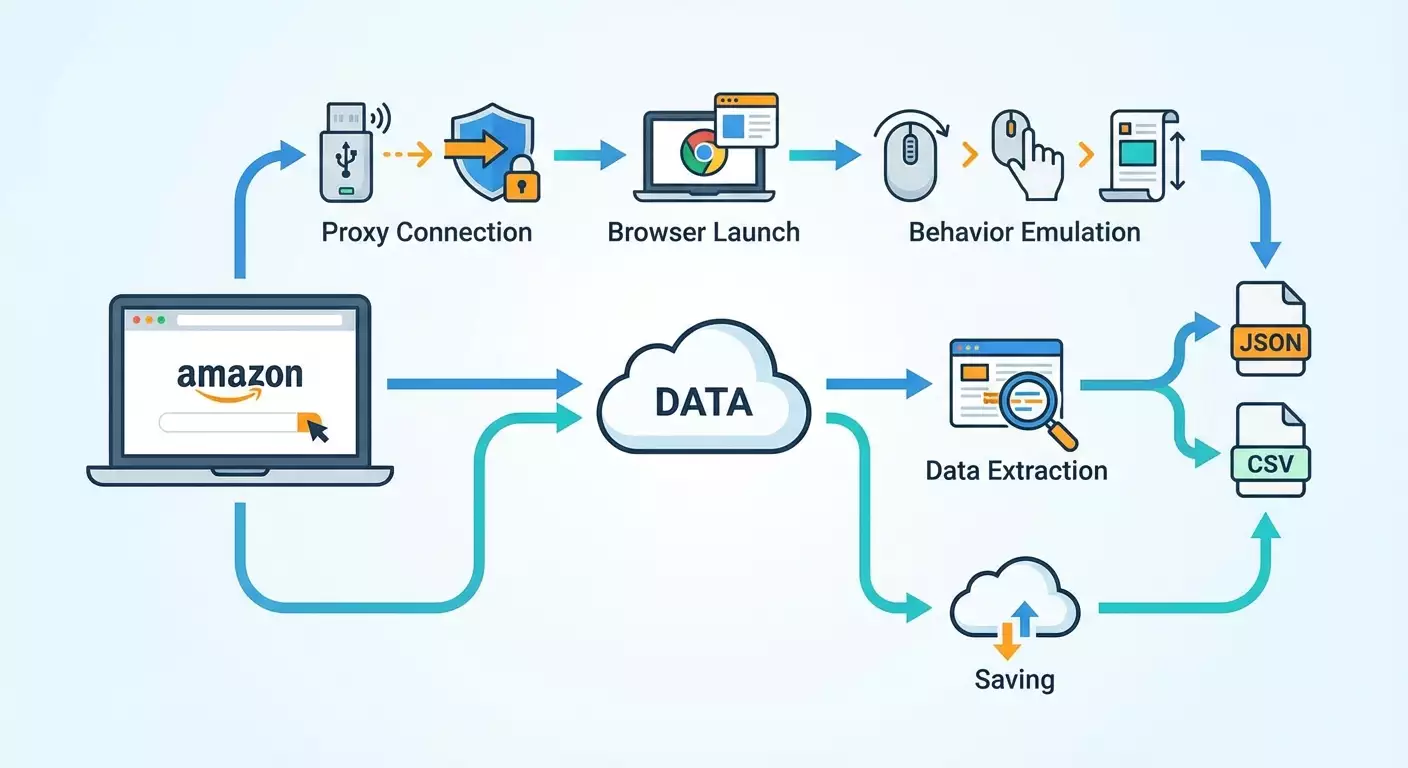
This guide will take you from an empty folder on your computer to a working script that scrapes Amazon product listings using Playwright and mobile proxies. We will walk you through the installation of Node.js and all dependencies, connect stealth plugins to reduce the chance of blocks, set up mobile proxies with IP and username/password authentication, implement real user behavior emulation, randomize delays, and rotate User-Agent strings. You'll learn how to gather product title, price, rating, number of reviews, ASIN, images, and description, and save the results in JSON and CSV formats. We'll also incorporate error handling, CAPTCHA recognition, implement retries with exponential backoff, and configure scaling for hundreds of products.
This guide is designed for beginners, with elements for advanced users. We explain everything in simple language, document each step, and show how to verify the results. The average time to complete the process is between 4 to 8 hours, including setup and testing. By the end, you'll have a reproducible project that can run on Windows, macOS, or Linux. Additionally, you'll receive a set of tips on how to speed up data collection without increasing the likelihood of blocks.
⚠️ Attention: Scraping may violate the terms of use of websites. Ensure that you adhere to the terms, applicable laws, and data usage requirements in your region before running any scripts.
Tip: Keep track of intermediate results and take notes on which proxies you used, which delay settings worked best, and which Amazon marketplaces you tested. This will speed up debugging and scaling.
Preliminary Preparation
Before writing any code, let's prepare the environment and access. You will need: access to a computer with internet, rights to install software, an account with a mobile proxy provider, and basic command-line knowledge. Don’t worry if you’re a total beginner; everything is detailed below.
Necessary Tools and Access
- Node.js version 18 or higher (20 LTS recommended).
- Playwright and the playwright-extra library with the stealth plugin.
- An account with mobile proxies at mobileproxy.space with an active plan.
- A code editor (any will do; for example, Visual Studio Code).
- A command line: Terminal for macOS and Linux, PowerShell or CMD for Windows.
System Requirements
- Operating System: Windows 10/11, macOS 12+, Ubuntu 20.04+ or equivalent Linux.
- RAM: at least 8 GB (16 GB recommended for parallel scraping).
- Disk: at least 5 GB of free space (the browser binaries from Playwright take up significant space).
- Stable internet connection, preferably wired.
What to Download and Install
- Node.js: install the official distribution and check the versions with the command node -v and npm -v.
- Playwright and browsers: we will install them through npm during the setup.
- Code Editor: install and open the project folder.
Tip: Install Git to version your project and easily roll back changes. This is not mandatory but highly useful.
✅ Verification: The command node -v should output the version (for example, v20.11.0). If the command is not found, re-install Node.js and restart the terminal.
Basic Concepts
Before writing scripts, let's clarify the key terms and general principles of operation. This will help avoid mistakes and make it easier to understand what we are configuring and why.
Key Terms
- Scraping — the automated extraction of data from web pages, such as titles, prices, ratings.
- Playwright — a library for controlling browsers (Chromium, Firefox, WebKit) through code. It allows you to click buttons, enter text, and scroll pages.
- Stealth — a set of techniques that reduce the likelihood of automation detection on the site (hiding automation, plausible browser parameters).
- Mobile Proxies — proxy servers with mobile IP addresses, which are often considered more 'human-like' and are less frequently blocked.
- ASIN — a unique identifier for products on Amazon.
- CAPTCHA — a 'Are you a robot?' check; it often appears during suspicious activity.
- Retry — a mechanism for retrying a request in case of failure, often with increased delay (exponential backoff).
Basic Principles
- Take your time: respect delays and imitate real user actions.
- Scroll, hover, and click — this brings the behavior closer to that of a human user.
- Randomize User-Agent and context parameters.
- Use proxies, preferably mobile ones, and change the IP periodically.
- Handle errors and add retry logic.
⚠️ Attention: High volumes of requests without delays will almost certainly lead to blocks and potential CAPTCHA appearances. Respect the website's resources and adhere to load limits.
✅ Verification: If you understand the terms Playwright, proxy, ASIN, stealth, and retry, you can proceed further. If not, read the definitions again and keep them handy.
Step 1: Install Node.js and Prepare the Project
Step Goal
To prepare a working folder and basic files for the Node.js project, ensuring that the environment is ready for the installation of dependencies.
Step-by-Step Instructions
- Create a project folder, for example amazon-playwright-scraper.
- Open the folder in your terminal.
- Initialize the project with the command npm init -y. This will create a package.json file.
- Create subfolders src and data. The src folder will contain the code, while the data folder will hold input and output data.
- Create a .env file in the project root to store confidential settings: proxies, region, constants. For now, leave it empty.
- Install dotenv by running npm i dotenv to load environment variables.
- Create a file src/index.js — this will be the entry point.
- Create a file data/input_asins.txt and add a few ASINs, one per line (for example, B0C61JQSG7, B08N5WRWNW). You can take these ASINs from the address bar of product listings or from the specifications block.
Key Points
- Project structure makes maintenance easier. Separate your code and data.
- .env should not be committed to a public repository. It will contain passwords and confidential settings.
Tip: Immediately add a .gitignore file and include node_modules, datahost:port'.
Tip: Add multiple proxies to the PROXY_SERVERS list to have backups for rotation and parallel workers. Separate them with commas.
Expected Outcome
.env contains correct variables, and you understand how authentication works and how to change IPs.
Possible Issues and Solutions
- IP authentication doesn’t work. Solution: check what your machine's external IP is, add it to the provider's whitelist, and restart the session.
- Invalid username/password. Solution: verify your credentials, reset the password in the provider's dashboard if necessary.
✅ Verification: The .env file contains PROXY_MODE, PROXY_SERVERS, and MARKET. You confirm that the proxy is active and either the IP is authorized or the login/password is correct.
Step 4: Basic Script to Launch the Browser with Proxy and Stealth
Step Goal
Create a minimal working script that launches Chromium through playwright-extra with the stealth plugin, uses mobile proxies, opens the Amazon homepage, and closes correctly.
Step-by-Step Instructions
- Open the src/index.js file.
- Add the basic import and initialization code: include dotenv, playwright-extra, and the stealth plugin.
- Read the environment variables from .env: proxy mode, server list, credentials, MARKET domain.
- Implement the getProxyOptions function that returns the proxy object for Playwright based on the selected server and authentication mode.
- Implement a simple browser launch using chromium.launch and verify that the MARKET page loads without errors.
- Close the browser and log step success.
Example Code for src/index.js (Minimal Test)
Copy and paste, then adapt for your needs:
require('dotenv').config();
const { chromium } = require('playwright-extra');
const stealth = require('puppeteer-extra-plugin-stealth')();
chromium.use(stealth);
const { setTimeout: sleep } = require('timers/promises');
const market = process.env.MARKET || 'https:/www.amazon.com';
const proxyMode = process.env.PROXY_MODE || 'ip';
const proxyServers = (process.env.PROXY_SERVERS || '').split(',').map(s => s.trim()).filter(Boolean);
const proxyUser = process.env.PROXY_USER || '';
const proxyPass = process.env.PROXY_PASS || '';
function pickProxy() {
 if (!proxyServers.length) return null;
 const i = Math.floor(Math.random() * proxyServers.length);
 return proxyServers[i];
}
function getProxyOptions(server) {
 if (!server) return {};
 const [host, port] = server.split(':');
 const proxyUrl = 'http:' + host + ':' + port;
 if (proxyMode === 'login') {
return { server: proxyUrl, username: proxyUser, password: proxyPass };
 }
 return { server: proxyUrl };
}
(async () => {
 const server = pickProxy();
 const proxy = getProxyOptions(server);
 const browser = await chromium.launch({ headless: true, proxy });
 const context = await browser.newContext({
viewport: { width: 1366, height: 768 },
userAgent: 'Mozilla/5.0 (Windows NT 10.0; Win64; x64) AppleWebKit/537.36 (KHTML, like Gecko) Chrome/121.0.0.0 Safari/537.36'
 });
 const page = await context.newPage();
 await page.goto(market, { waitUntil: 'domcontentloaded', timeout: 45000 });
 await sleep(1000 + Math.random() * 2000);
 await browser.close();
 console.log('Base launch OK via proxy:', server || 'no-proxy');
})().catch(err => {
 console.error('Base launch failed', err);
 process.exit(1);
});
Key Points
- Changing proxies in Playwright usually requires a new browser process. Plan accordingly when scaling.
- Stealth is connected through chromium.use(stealth). This must occur before launch.
Tip: During the debugging phase, use headless: false to see what happens in the browser window. For mass scraping, revert to headless: true.
Expected Outcome
The script opens the Amazon marketplace homepage through your proxy and then closes the browser without errors.
Possible Issues and Solutions
- The page does not open. Reason: the proxy is unreachable. Solution: replace the server with a working one or temporarily run it without a proxy.
- Proxy authentication error. Reason: incorrect username/password or IP. Solution: double-check .env and correct the information.
✅ Verification: The console outputs 'Base launch OK via proxy' and the proxy address (or 'no-proxy' if none is configured). There are no errors.
Step 5: Logic for Parsing Amazon Product Listings
Step Goal
Learn how to open a product page by ASIN, correctly select selectors, extract title, price, rating, review count, ASIN, images, and description. We will implement a universal function named parseProduct.
Step-by-Step Instructions
- Create a file src/scraper.js for parsing logic.
- Implement the function buildProductUrl(market, asin) that returns a link in the form market + '/dp/' + asin.
- Add the extractors function with safe retrieval of text based on selectors with multiple fallbacks.
- Implement parseProduct(page, asin) that opens the listing and returns a data object.
- Require scraper.js in index.js and test it on 1–2 ASINs.
Example Code for src/scraper.js
Copy and adapt:
const { setTimeout: sleep } = require('timers/promises');
function buildProductUrl(market, asin) {
 return market.replace(/\/+$|\/+$/, '') + '/dp/' + asin;
}
async function getText(page, selectors) {
 for (const sel of selectors) {
try {
 const el = await page.locator(sel).first();
 if (await el.count()) {
const txt = (await el.innerText()).trim();
if (txt) return txt;
 }
} catch {}
 }
 return '';
}
async function getAttrAll(page, selector, attr) {
 try {
const els = await page.locator(selector);
const count = await els.count();
const out = [];
for (let i = 0; i < count; i++) {
 const el = els.nth(i);
 const v = await el.getAttribute(attr);
 if (v) out.push(v);
}
return out;
 } catch {
return [];
 }
}
function normalizePrice(str) {
 if (!str) return '';
 const m = str.replace(/[\s,]/g, '').match(/([0-9]+(?:\.[0-9]{1,2})?)/);
 return m ? m[1] : '';
}
function parseReviewsCount(str) {
 if (!str) return 0;
 const n = str.replace(/[^0-9]/g, '');
 return Number(n || '0');
}
async function parseProduct(page, market, asin) {
 const url = buildProductUrl(market, asin);
 await page.goto(url, { waitUntil: 'domcontentloaded', timeout: 60000 });
 try {
await page.waitForTimeout(500 + Math.random() * 700);
const accept = page.locator('input#sp-cc-accept, button#sp-cc-accept, input[name="accept"]');
if (await accept.count()) {
 await accept.click({ delay: 50 + Math.random() * 60 });
 await page.waitForTimeout(300 + Math.random() * 400);
}
 } catch {}
 const title = await getText(page, ['#productTitle', 'h1 span#productTitle', 'span#productTitle']);
 const priceRaw = await getText(page, ['#corePriceDisplay_desktop_feature_div span.a-offscreen', '.a-price .a-offscreen', '#priceblock_ourprice', '#priceblock_dealprice']);
 const price = normalizePrice(priceRaw);
 const ratingRaw = await getText(page, ['i[data-hook="average-star-rating"] span.a-icon-alt', 'span[data-hook="rating-out-of-text"]', 'i.a-icon-star span.a-icon-alt']);
 const rating = ratingRaw ? (ratingRaw.match(/[0-9,.]+/) || [''])[0] : '';
 const reviewsRaw = await getText(page, ['#acrCustomerReviewText', '#acrCustomerReviewLink #acrCustomerReviewText']);
 const reviewsCount = parseReviewsCount(reviewsRaw);
 let asinFound = asin;
 try {
const asinInput = page.locator('input#ASIN, input[name="ASIN"]');
if (await asinInput.count()) {
 const v = await asinInput.first().getAttribute('value');
 if (v) asinFound = v;
}
 } catch {}
 const thumbs = await getAttrAll(page, ['#altImages img', '#imageBlockThumbs img'].join(','), 'src');
 const images = Array.from(new Set(thumbs.map(s => s.replace(/\._.*_\.jpg/i, '.jpg'))));
 const description = await getText(page, ['#productDescription', '#bookDescription_feature_div', '#productFactsDesktopExpander']);
 const bulletsEls = await page.locator('#feature-bullets ul li span');
 const bulletsCount = await bulletsEls.count();
 const bullets = [];
 for (let i = 0; i < bulletsCount; i++) {
const t = (await bulletsEls.nth(i).innerText()).trim();
if (t && !/^\s*\(.*\)\s*$/.test(t)) bullets.push(t);
 }
 const features = bullets.join(' | ');
 return { url, asin: asinFound, title, price, rating, reviewsCount, images, description, features };
}
module.exports = { parseProduct, buildProductUrl };
Integration with src/index.js (Test on 1–2 ASINs)
Example:
require('dotenv').config();
const { chromium } = require('playwright-extra');
const stealth = require('puppeteer-extra-plugin-stealth')();
chromium.use(stealth);
const { parseProduct } = require('./scraper');
const { setTimeout: sleep } = require('timers/promises');
const market = process.env.MARKET || 'https:/www.amazon.com';
const proxyMode = process.env.PROXY_MODE || 'ip';
const proxyServers = (process.env.PROXY_SERVERS || '').split(',').map(s => s.trim()).filter(Boolean);
const proxyUser = process.env.PROXY_USER || '';
const proxyPass = process.env.PROXY_PASS || '';
function pickProxy() {
 if (!proxyServers.length) return null;
 const i = Math.floor(Math.random() * proxyServers.length);
 return proxyServers[i];
}
function getProxyOptions(server) {
 if (!server) return {};
 const [host, port] = server.split(':');
 const proxyUrl = 'http:' + host + ':' + port;
 if (proxyMode === 'login') {
return { server: proxyUrl, username: proxyUser, password: proxyPass };
 }
 return { server: proxyUrl };
}
(async () => {
 const server = pickProxy();
 const proxy = getProxyOptions(server);
 const browser = await chromium.launch({ headless: true, proxy });
 const context = await browser.newContext({
viewport: { width: 1366, height: 768 },
userAgent: 'Mozilla/5.0 (Windows NT 10.0; Win64; x64) AppleWebKit/537.36 (KHTML, like Gecko) Chrome/121.0.0.0 Safari/537.36',
locale: 'en-US'
 });
 const page = await context.newPage();
 const asin = 'B08N5WRWNW';
 const data = await parseProduct(page, market, asin);
 console.log(data);
 await browser.close();
})().catch(console.error);
Key Points
- Amazon has a dynamic interface. We use multiple selectors for reliability.
- ASIN can be obtained both from the URL and a hidden field. We cover our bases.
Tip: If data is not found, temporarily use page.screenshot to save an image in data/debug-screenshots. It’s easier to understand what rendered and what selectors are available from the screenshot.
Expected Outcome
The console should display an object with fields asin, title, price, rating, reviewsCount, images, description, and features. Some fields may be empty for certain listings — this is normal; we will add additional checks later.
Possible Issues and Solutions
- Empty title. Reason: banners obstruct content. Solution: close the banners or wait longer.
- Empty price. Reason: no price for a specific listing. Solution: add fallback or parse the options block.
✅ Verification: You see a correct title and a non-empty ASIN. At least one image should be present in the images array.
Step 6: Randomizing Behavior, Delays, Scroll, Hover, and Clicks
Step Goal
Reduce the likelihood of automation detection. We’ll add random delays, mouse movements, scrolling, hovering over elements, clicking, and various waiting schemes.
Step-by-Step Instructions
- Create a file src/humanize.js with functions for random delay and behavior.
- Implement randomDelay(min, max), randomMouseMove(page), humanScroll(page), hoverRandomThumb(page).
- Call these functions during parsing before data extraction.
- Add unpredictability: different actions' orders, random click points, short pauses.
Example Code for src/humanize.js
Example:
const { setTimeout: sleep } = require('timers/promises');
function rand(min, max) {
 return Math.floor(Math.random() * (max - min + 1)) + min;
}
async function randomDelay(minMs, maxMs) {
 const t = rand(minMs, maxMs);
 await sleep(t);
}
async function randomMouseMove(page) {
 const w = 1366, h = 768;
 const steps = rand(3, 9);
 let x = rand(10, w - 10), y = rand(10, h - 10);
 for (let i = 0; i < steps; i++) {
x = Math.max(1, Math.min(w - 1, x + rand(-60, 60)));
y = Math.max(1, Math.min(h - 1, y + rand(-40, 40)));
await page.mouse.move(x, y, { steps: rand(2, 5) });
await sleep(rand(40, 120));
 }
}
async function humanScroll(page) {
 const total = rand(2000, 6000);
 let scrolled = 0;
 while (scrolled < total) {
const delta = rand(200, 600);
await page.mouse.wheel(0, delta);
scrolled += delta;
await sleep(rand(200, 600));
 }
}
async function hoverRandomThumb(page) {
 const thumbs = page.locator('#altImages li, #imageBlockThumbs li');
 const count = await thumbs.count();
 if (count > 0) {
const i = rand(0, Math.min(count - 1, 4));
const el = thumbs.nth(i);
await el.hover();
await sleep(rand(200, 700));
 }
}
module.exports = { randomDelay, randomMouseMove, humanScroll, hoverRandomThumb, rand };
Integration
In src/scraper.js, before extracting data, call:
const human = require('./humanize');
await human.randomMouseMove(page);
await human.humanScroll(page);
await human.hoverRandomThumb(page);
await human.randomDelay(400, 1100);
Key Points
- Too long delays will slow down data collection, too short will increase risks. Find a balance.
- Behavior imitation should not be predictable. Add randomness.
Tip: Store delays in .env so you don't have to change the code: MIN_DELAY_MS and MAX_DELAY_MS. Read the values from there in humanize.js.
Expected Outcome
The script now 'acts like a human': it makes small pauses, moves the mouse, scrolls, and hovers over thumbnails. Blocks and CAPTCHA will be less frequent.
Possible Issues and Solutions
- Significant slowdowns. Solution: reduce the number of actions, remove some hover, optimize delays.
- CAPTCHA still appears. Solution: add proxy rotation and change request speeds.
✅ Verification: When running headless: false, you can see the cursor moving, the page scrolling, and thumbnails highlighting during hover. There are no errors.
Step 7: Rotating User-Agent and Scaling for Hundreds of Products
Step Goal
Reduce correlation between requests. We’ll add User-Agent rotation, limit parallelism, and prepare a task queue and proxy pool management.
Step-by-Step Instructions
- The installed user-agents package allows for plausible strings. Prepare the getRandomUA function.
- Create a simple queue: limit the number of simultaneously running browsers with p-limit or p-queue.
- Add a proxy pool: select an available proxy from the list, launch the browser with it, and return it to the pool after completion.
- Refactor index.js to read ASINs from the file, create tasks, and save results.
Example Code for src/index.js (Scalable Version)
Example:
require('dotenv').config();
const { chromium } = require('playwright-extra');
const stealth = require('puppeteer-extra-plugin-stealth')();
chromium.use(stealth);
const fs = require('fs');
const path = require('path');
const PQueue = require('p-queue').default;
const UserAgents = require('user-agents');
const { parseProduct } = require('./scraper');
const human = require('./humanize');
const market = process.env.MARKET || 'https:/www.amazon.com';
const proxyMode = process.env.PROXY_MODE || 'ip';
const proxyServers = (process.env.PROXY_SERVERS || '').split(',').map(s => s.trim()).filter(Boolean);
const proxyUser = process.env.PROXY_USER || '';
const proxyPass = process.env.PROXY_PASS || '';
const MIN_DELAY_MS = Number(process.env.MIN_DELAY_MS || '800');
const MAX_DELAY_MS = Number(process.env.MAX_DELAY_MS || '2000');
const CONCURRENCY = Number(process.env.CONCURRENCY || '2');
function getRandomUA() {
 const ua = new UserAgents({ deviceCategory: 'desktop' }).toString();
 return ua;
}
function getProxyOptions(server) {
 if (!server) return {};
 const [host, port] = server.split(':');
 const proxyUrl = 'http:' + host + ':' + port;
 if (proxyMode === 'login') {
return { server: proxyUrl, username: proxyUser, password: proxyPass };
 }
 return { server: proxyUrl };
}
async function withBrowser(server, fn) {
 const proxy = getProxyOptions(server);
 const browser = await chromium.launch({ headless: true, proxy });
 try {
const context = await browser.newContext({
 viewport: { width: 1366, height: 768 },
 userAgent: getRandomUA(),
 locale: 'en-US'
});
const page = await context.newPage();
await fn(page);
await context.close();
 } finally {
await browser.close();
 }
}
async function processAsin(server, asin) {
 let result = null;
 await withBrowser(server, async page => {
await human.randomDelay(MIN_DELAY_MS, MAX_DELAY_MS);
result = await parseProduct(page, market, asin);
 });
 return result;
}
function readAsins(file) {
 const p = path.resolve(file);
 const txt = fs.readFileSync(p, 'utf8');
 return txt.split(/\r?\n/).map(s => s.trim()).filter(Boolean);
}
(async () => {
 const asins = readAsins('data/input_asins.txt');
 const queue = new PQueue({ concurrency: CONCURRENCY });
 const outputs = [];
 let proxyIndex = 0;
 function nextProxy() {
if (!proxyServers.length) return null;
proxyIndex = (proxyIndex + 1) % proxyServers.length;
return proxyServers[proxyIndex];
 }
 for (const asin of asins) {
queue.add(async () => {
 const server = nextProxy();
 const data = await processAsin(server, asin);
 outputs.push(data);
 console.log('Done', asin, data && data.title ? 'OK' : 'EMPTY');
 await human.randomDelay(MIN_DELAY_MS, MAX_DELAY_MS);
});
 }
 await queue.onIdle();
 fs.writeFileSync('data/output.json', JSON.stringify(outputs, null, 2));
 console.log('Saved to data/output.json');
})().catch(err => {
 console.error(err);
 process.exit(1);
});
Key Points
- Be careful with CONCURRENCY. Start with 1–2 and increase to 3–4, monitoring for blocks.
- User-Agent is changed when creating the context. This adds diversity.
Tip: For specific Amazon marketplaces, use the corresponding locale and timezone for the context. For instance, for Germany use locale: 'de-DE'.
Expected Outcome
The script processes the list of ASINs, uses a proxy pool, and saves the output array in output.json.
Possible Issues and Solutions
- Excessive blocks. Solution: reduce CONCURRENCY, increase delays, add more proxies.
- Low speed. Solution: optimize delays, but don’t go overboard; increase the proxy pool.
✅ Verification: The data/output.json contains objects with the fields title and asin. Most listings have been filled correctly.
Step 8: Saving Results in JSON and CSV
Step Goal
Add reliable saving in both formats. JSON for flexible analysis, CSV for quick import into spreadsheets and BI systems.
Step-by-Step Instructions
- Create a file src/save.js with functions saveJSON and saveCSV.
- Add CSV header generation and data normalization (escaping delimiters).
- Call the saving functions in index.js after completing the queue.
- Verify the correctness of the files in data/output.json and data/output.csv.
Example Code for src/save.js
Example:
const fs = require('fs');
const path = require('path');
function saveJSON(arr, file) {
 const p = path.resolve(file);
 fs.writeFileSync(p, JSON.stringify(arr, null, 2), 'utf8');
}
function escapeCsv(v) {
 if (v == null) return '';
 const s = String(v);
 if (/[",\n;]/.test(s)) return '"' + s.replace(/"/g, '""') + '"';
 return s;
}
function saveCSV(arr, file) {
 const p = path.resolve(file);
 const header = ['asin','title','price','rating','reviewsCount','images','description','features','url'];
 const rows = [header.join(';')];
 for (const it of arr) {
if (!it) continue;
const row = [
 it.asin || '',
 it.title || '',
 it.price || '',
 it.rating || '',
 it.reviewsCount || 0,
 (it.images || []).join(' '),
 it.description || '',
 it.features || '',
 it.url || ''
].map(escapeCsv).join(';');
rows.push(row);
 }
 fs.writeFileSync(p, rows.join('\n'), 'utf8');
}
module.exports = { saveJSON, saveCSV };
Integration
In src/index.js, after processing the queue, import the save functions:
const { saveJSON, saveCSV } = require('./save');
saveJSON(outputs, 'data/output.json');
saveCSV(outputs, 'data/output.csv');
Key Points
- In CSV, use a stable delimiter such as a semicolon. This will simplify importing into various tables.
- Escape quotes and line breaks in texts.
Tip: Add a timestamp to the filename for versioning, e.g., data/output_2026-02-01_1200.csv.
Expected Outcome
In the data folder, there should be two files: output.json and output.csv. The JSON provides a convenient array of objects, while the CSV contains rows with headers.
Possible Issues and Solutions
- Encoding issues. Solution: save in UTF-8 and open in an editor that supports that encoding.
- Large files. Solution: save in chunks or line by line for huge volumes of data.
✅ Verification: Open output.csv in any spreadsheet application. The data in columns should not be misaligned, text should be quoted, and images should be concatenated with spaces.
Step 9: Error Handling, CAPTCHA, Timeouts, Retries with Exponential Backoff
Step Goal
Increase reliability. We’ll add recognition of problematic situations, retries with increased delay, and change proxies upon failures. We’ll prepare logs for analysis.
Step-by-Step Instructions
- Add the function isCaptchaPage(page) that checks the URL for the presence of words CAPTCHA and the presence of verification elements.
- Add a retry wrapper around processAsin with exponential backoff and jitter.
- For repeated errors, change the proxy and User-Agent.
- Log statuses and steps, save erroneous pages if needed.
Example Code for Retry in src/index.js
Example:
function isCaptchaHtml(html) {
 return /captcha/i.test(html) || /Type the characters/i.test(html) || /Enter the characters/i.test(html);
}
async function tryProcessWithRetry(asin) {
 const maxRetries = Number(process.env.MAX_RETRIES || '5');
 let attempt = 0;
 let lastError = null;
 while (attempt < maxRetries) {
attempt++;
let server = proxyServers.length ? proxyServers[(attempt - 1) % proxyServers.length] : null;
try {
 const data = await withBrowser(server, async page => {
await human.randomDelay(MIN_DELAY_MS, MAX_DELAY_MS);
await page.goto(market.replace(/\/$/, '') + '/dp/' + asin, {
 waitUntil: 'domcontentloaded',
 timeout: 60000
});
const html = await page.content();
if (isCaptchaHtml(html)) {
 throw new Error('CAPTCHA');
}
for (let i = 0; i < 2; i++) await human.randomMouseMove(page);
return await parseProduct(page, market, asin);
 });
 if (data && data.title) return data;
 throw new Error('Empty data');
} catch (err) {
 lastError = err;
 const base = 1200;
 const backoff = Math.min(base * Math.pow(2, attempt - 1), 20000);
 const jitter = Math.floor(Math.random() * 400);
 console.warn('Retry', attempt, 'ASIN', asin, 'server', server, 'err', err.message);
 await new Promise(r => setTimeout(r, backoff + jitter));
}
 }
 throw lastError || new Error('Unknown error');
}
Integration into the Queue
Replace the processing in the queue with:
const data = await tryProcessWithRetry(asin);
Key Points
- Exponential backoff helps alleviate frequent retries.
- In case of severe CAPTCHA occurrences, reduce parallelism and increase pauses. Change IP.
Tip: If your mobile proxy provider supports forced IP change via URL, call that endpoint after several consecutive failures. Wait 30–60 seconds after changing the IP.
⚠️ Attention: Do not attempt to bypass protections through malicious means. Avoid using hacking or unauthorized access. Operate strictly within the bounds of lawful and ethical practices.
Expected Outcome
The script is more resilient against blocks. Errors are retried with pauses, proxies and User-Agents are changed, and final data is preserved for most ASINs.
Possible Issues and Solutions
- Many empty listings. Solution: increase load timeout, add waits for specific selectors.
- Repeated CAPTCHAs. Solution: reduce speed, add more proxies, conduct scraping during different time windows.
✅ Verification: Logs should show Retry steps. After several attempts, most ASINs should be parsed successfully. The number of fatal errors should decrease.
Verifying the Outcome
Checklist
- Node.js is installed, npm is working.
- Playwright and the Chromium browser are installed.
- The stealth plugin is active.
- Mobile proxies are connected (IP or login/password).
- The script opens Amazon and scrapes the product using ASIN.
- Data is saved in JSON and CSV formats.
- Retry with backoff is functional, handling CAPTCHA and timeouts correctly.
- The script scales up to dozens and hundreds of ASINs using queues and proxy pools.
How to Test
- Run on 3–5 ASINs. Ensure that all key fields are present in output.json.
- Expand the list to 50 ASINs. Check stability and calculate the share of successful parsing.
- Experiment with various CONCURRENCY settings: 1, 2, 3. Choose the optimal balance for speed and blocks.
Success Indicators
- Successfully parsed at least 80% of listings on a small sample.
- CAPTCHA appears infrequently and is handled by retry.
- Data is accurate, loading into spreadsheets without column misalignment.
✅ Verification: If upon rerunning on the same set of ASINs you consistently receive comparable results, your pipeline is ready for scaling.
Common Errors and Solutions
- Issue: Empty title. Reason: the page did not fully load. Solution: increase the timeout and add a wait for #productTitle.
- Issue: Empty price. Reason: no price for the current variation. Solution: parse .a-price .a-offscreen and alternative selectors, switch variations if necessary.
- Issue: CAPTCHA at every step. Reason: scraping is too fast or repetitive parameters. Solution: reduce parallelism, add delays, rotate IPs and User-Agents.
- Issue: Timeouts. Reason: slow proxy. Solution: change proxies, increase timeout, add retry with backoff.
- Issue: Proxy authorization failure. Reason: incorrect credentials or IP list. Solution: double-check .env, IP whitelist, restart the session.
- Issue: CSV opens with 'broken' lines. Reason: unescaped quotes and line breaks. Solution: add escapeCsv and use a stable delimiter.
- Issue: memory crashes when processing hundreds of listings. Reason: too many parallel browsers. Solution: reduce CONCURRENCY, close contexts and browsers promptly.
Additional Features
Advanced Settings
- Locality and time zones: create contexts with timezoneId, locale, and geolocation matching the market.
- Device Settings: imitate a laptop or tablet with specific device viewport and user agent.
- Caching: save intermediate results to avoid re-querying listings.
- Trigger IP rotation by event: after 2–3 errors, call the IP rotation from the provider, then wait and retry.
Optimization
- Warm-up: perform 1–2 'warm-up' hits on neutral pages to load cookies and scripts.
- Flexible queue: gradually increase parallelism with low error rates.
- Log storage: save logs to files with timestamps, analyze peaks in errors.
- Distributed launch: run multiple instances on different machines/server locations.
Tip: Add metrics monitoring: average time per listing, success rates, CAPTCHA frequency, network speed, and slow proxies.
Tip: Store results in a database (e.g., SQLite or Postgres) if the volume grows. This will simplify analytics and updating.
Tip: Add deduplication: if the same ASIN appears multiple times, update the record instead of creating duplicates.
Tip: Use scheduling (cron) for regular price and review updates. Run it during low traffic hours.
Tip: For certain listings, it may be helpful to load the reviews tab and parse multiple pages of reviews. Do this selectively to avoid overloading.
FAQ
- Can I scrape without proxies? Yes, but the risk of bans is higher. Mobile proxies significantly reduce the frequency of CAPTCHAs and bans.
- How to select an Amazon region? Specify MARKET in the .env file, e.g., https://www.amazon.com or another domain. Match the context locale to the region.
- Is headless necessary? For debugging, it’s better to set headless: false; for batch scraping, use headless: true. This is faster and more stable.
- Why is the price sometimes empty? Some listings have no price, or it is hidden in variations. Add additional selectors and logic for switching variations.
- How to tell if I’ve been blocked? Frequent CAPTCHAs, redirects to verification pages, empty blocks. Reduce speed, change IP, and increase delays.
- How many threads can I run? Start with 1–2. If there are no errors, try 3–4. Monitor metrics and balance with the number of proxies.
- Can I save images? We save links. To download files, iterate through the images array and download one at a time with a delay.
- How to update data? Keep past results with timestamps and regularly run the script on the ASIN list. Update only changed fields.
- Why are mobile proxies better than regular ones? Mobile IPs are less likely to face strict bans and are perceived more like real traffic from mobile networks.
- What if my proxy provider is slow? Add a few more proxies, reduce parallelism, and discard slow servers based on response time metrics.
Conclusion
You have set up a fully functioning Amazon scraping pipeline: installed Node.js and Playwright, connected playwright-extra and the stealth plugin, configured mobile proxies with IP and login/password authentication, added real behavior emulation, randomized delays, and User-Agent rotation. You learned to extract key data from product pages — title, price, rating, review count, ASIN, images, and description — and save them in both JSON and CSV formats. We implemented error handling, CAPTCHA recognition, and retries with exponential backoff, and scaled for hundreds of products through a task queue and proxy pool.
From here, you can delve deeper: scraping product variations, collecting reviews across pages, integrating with a database, scheduling regular runs, monitoring metrics, and automatically switching proxies based on low success rates. Start with small batches, fine-tune behavior, and then scale up.
⚠️ Attention: Always consider legal restrictions and platform rules. Maintain a reasonable request pace, do not harm platform infrastructure, and respect user privacy.
Tip: Automate reporting: save overall statistics (successes, failures, average time) after each run to make quick optimization decisions.