Automate Marketplace Review Collection: A Step-by-Step Guide with AI Analysis & Reports
Contenido del artículo
- Introduction
- Preparation
- Key concepts
- Step 1: choose sources and define legal boundaries
- Step 2: set up your environment and tools
- Step 3: design your data and file schema
- Step 4: basic review scraper (http requests)
- Step 5: handle dynamic pages (headless browser)
- Step 6: proxy rotation, headers, and rate limiting
- Step 7: cleaning, normalizing, and de‑duplication
- Step 8: ai sentiment analysis and complaint themes
- Step 9: reports and metrics: csv, summaries, and key charts
- Step 10: automation and scheduling
- Quality check
- Common mistakes and fixes
- Advanced options
- Faq
- Conclusion
Introduction
In this step‑by‑step guide, you’ll set up a fully automated pipeline to collect marketplace reviews, clean and normalize them, run AI‑powered sentiment analysis, and generate simple reports. You’ll get ready‑to‑run command examples, a working project structure, checklists to validate your setup, and tips for scaling. We’ll use approachable tools, so you can get results without programming experience. Important: we act legally and ethically, respecting platform rules and load limits.
This guide is for marketers, marketplace sellers, analysts, brand owners, and beginner developers. Nothing complicated: we explain every action in plain language. If you wish, you can dive into advanced settings, improve stability and speed, and add dashboards.
What you should know: basic computer literacy, installing software, and working with files and folders. Helpful but optional: beginner‑level Python. We’ll show the exact commands and explain each one.
How long it takes: 3–6 hours for the basic setup and first results. For full automation with a scheduler, proxies, and analytics, expect 1–2 days. That’s a realistic estimate for a beginner.
Preparation
Tools and access you’ll need: a computer with Windows, macOS, or Linux; internet access; Python 3.10+; pip; marketplace accounts (if you need access to personal data or APIs); and a proxy provider if required. We’ll use an HTTP library, a lightweight SQLite database, and AI for sentiment analysis.
System requirements: at least 4 GB RAM; 2 GB free disk space; ability to install Python packages; stable internet. For faster AI analytics, 8 GB RAM is recommended. A GPU is not required but can speed things up.
What to download and install: Python 3.10+; command‑line tools (PowerShell on Windows); libraries requests, httpx or aiohttp; for AI analysis transformers and torch; for data processing pandas. We’ll provide exact install commands in the instructions.
Create backups: if you already maintain a review database, back it up before you start. Save your current DB and raw files in a separate date‑stamped folder. This helps you roll back in case of errors.
⚠️ Note: Before collecting reviews, read the terms of use for each marketplace. Make sure you don’t break any rules, respect request frequency limits, and avoid collecting personal data that requires consent.
Key concepts
Plain‑English definitions: scraping (parsing) is automated data collection from web pages. A proxy is a relay for network requests that helps distribute traffic and mask your real IP. Proxy rotation means switching proxies between requests. Sentiment analysis detects the emotional tone of text: positive, neutral, or negative. ETL stands for extract, transform, load—moving data into storage in a clean format.
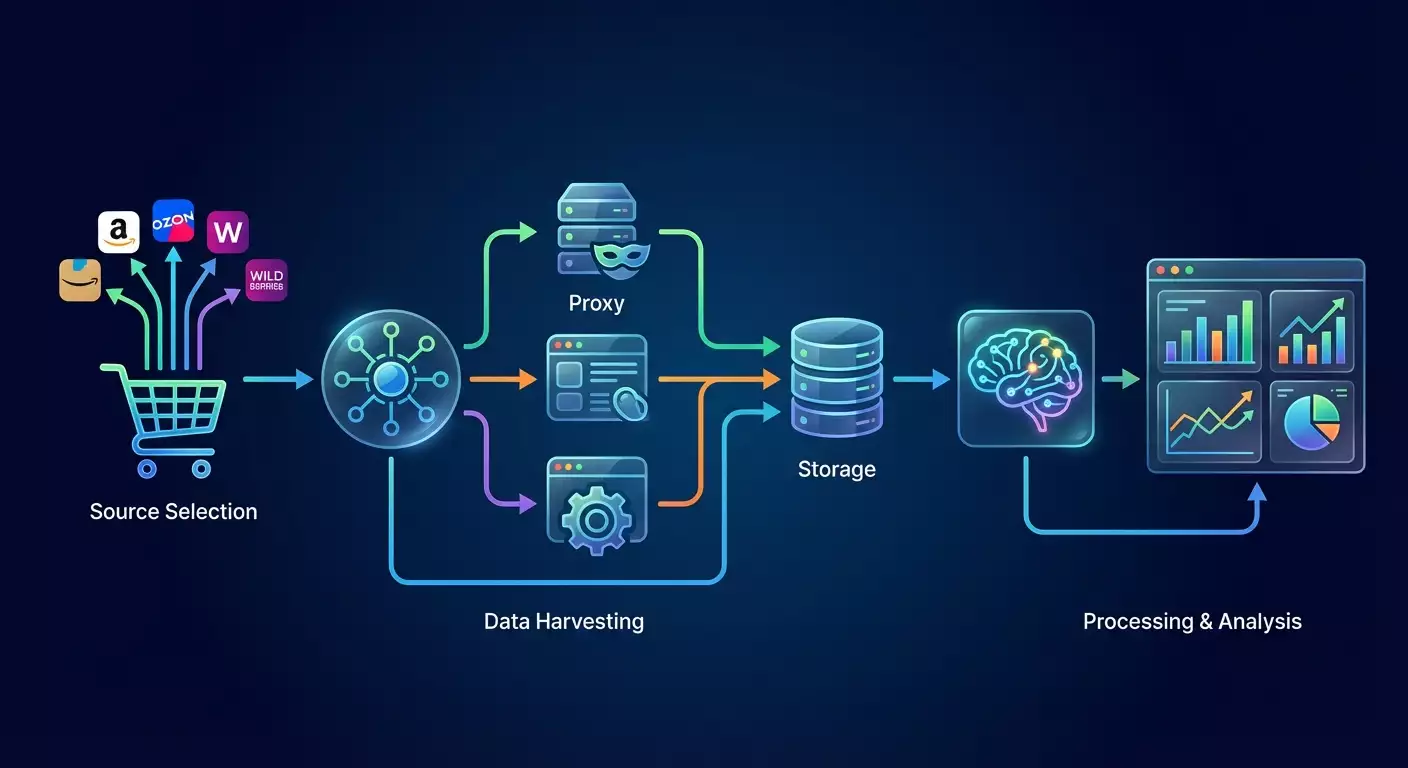
How our system works: you pick review sources, set up polite data collection with rate limits, clean and standardize fields, save them to a database, and run AI to determine sentiment. Then you build summaries: rating trends, recurring issues, and the frequency of negative mentions. A scheduler automates the whole process.
What to keep in mind: some pages load reviews dynamically. In those cases, you’ll need a headless browser such as Playwright. Some marketplaces offer public review APIs—these are more reliable and faster. Start with official APIs where available. Where not, carefully scrape within legal and polite limits.
Step 1: Choose sources and define legal boundaries
Goal
Identify specific product pages or stores to collect reviews from, and confirm that collection is allowed under the platform’s rules.
Step‑by‑step
- List the marketplaces where your products are sold. Example: Marketplace A (product pages), Marketplace B (store pages).
- For each source, determine the review page URLs. Usually, it’s the Reviews tab on the product page.
- Review the platform’s terms of use and robots.txt. Learn rate limits and permissions.
- Decide whether to use an official API. If there’s public documentation and a key, that’s best.
- Define scope: how many products and how often to refresh. Example: 500 products, daily updates.
- Choose storage: start with CSV or use SQLite for automation.
Key points: don’t collect private or personal data. Respect request rates. Avoid overloading the site.
Tip: start with 5–10 product pages, debug the process, then scale.
✅ Check: you have a table or document with review URLs, a frequency plan, and a note confirming legal feasibility.
Possible issues: the Reviews tab URL isn’t directly accessible. Fix: open the product page and find the request parameter that fetches reviews via API. You can see it in your browser’s DevTools Network panel.
Step 2: Set up your environment and tools
Goal
Create a project folder, install Python packages, and verify everything runs.
Step‑by‑step
- Create a project folder, e.g., C:/reviews_automation or ~/reviews_automation.
- Open your terminal in this folder.
- Create a Python virtual environment. Windows PowerShell: python -m venv .venv; macOS/Linux: python3 -m venv .venv.
- Activate it. Windows: .venv\Scripts\Activate.ps1; macOS/Linux: source .venv/bin/activate.
- Install core libraries. Run: pip install requests httpx beautifulsoup4 lxml pandas tqdm.
- For AI analysis install: pip install torch --index-url https://download.pytorch.org/whl/cpu and then pip install transformers sentencepiece.
- For dynamic pages, install Playwright if needed: pip install playwright and then python -m playwright install chromium.
Key points: use a virtual environment to isolate project dependencies.
Tip: if torch installs slowly, just wait—it’s normal.
✅ Check: run python -c "import requests, pandas, transformers; print('ok')". You should see ok.
Possible issues: version conflicts. Fix: upgrade pip with pip install --upgrade pip and reinstall.
Step 3: Design your data and file schema
Goal
Agree on a consistent format for reviews across marketplaces and prep a minimal database.
Step‑by‑step
- Define review fields: marketplace, product_id, review_id, rating, title, body, pros, cons, author, verified, created_at, region, helpful_count, seller_reply, url, scrape_ts, source_raw.
- Pick storage: start with a SQLite file reviews.db.
- Create the reviews table via Python in one command: python -c "import sqlite3; c=sqlite3.connect('reviews.db'); c.execute('create table if not exists reviews (marketplace text, product_id text, review_id text primary key, rating int, title text, body text, pros text, cons text, author text, verified int, created_at text, region text, helpful_count int, seller_reply text, url text, scrape_ts text, source_raw text)'); c.commit(); c.close(); print('db ready')".
- Prepare a data folder for JSON and CSV exports: create a folder named data.
- Prepare a sources file source_list.csv. Contents: marketplace,product_id,url. Fill in 5–10 rows.
Key points: review_id must be unique to avoid duplicates.
Tip: add an index on product_id and created_at to speed up analytics. Command: python -c "import sqlite3; c=sqlite3.connect('reviews.db'); c.execute('create index if not exists idx_product_date on reviews(product_id, created_at)'); c.commit(); c.close(); print('indexed')".
✅ Check: the file reviews.db exists and the command printed db ready. The index created without errors.
Possible issues: file access errors on Windows. Fix: close any programs using the file and retry.
Step 4: Basic review scraper (HTTP requests)
Goal
Collect reviews from simple sources where content is available without heavy dynamic loading, and save them to the database.
Step‑by‑step
- Create a single‑file scraper to load pages and extract reviews. Run: echo import sys,requests,bs4,json,sqlite3,datetime,random,time; from bs4 import BeautifulSoup; import lxml; import hashlib; import pandas as pd; import argparse; ap=argparse.ArgumentParser(); ap.add_argument('--url'); ap.add_argument('--marketplace'); ap.add_argument('--product'); ap.add_argument('--ua',default='Mozilla/5.0'); ap.add_argument('--delay',type=float,default=1.0); args=ap.parse_args(); s=requests.Session(); s.headers.update({'User-Agent':args.ua}); r=s.get(args.url,timeout=30); html=r.text; soup=BeautifulSoup(html,'lxml'); # Example extraction — adjust selectors for your source; reviews=[]; cards=soup.select('[data-review]') or soup.select('.review') or []; now=datetime.datetime.utcnow().isoformat(); conn=sqlite3.connect('reviews.db'); for i,card in enumerate(cards): rating_el=card.select_one('[data-rating]') or card.select_one('.rating') or None; rating=int(rating_el.get('data-rating',5)) if rating_el else 0; title_el=card.select_one('.title') or None; title=title_el.get_text(strip=True) if title_el else ''; body_el=card.select_one('.body') or card.select_one('.review-text') or None; body=body_el.get_text(' ',strip=True) if body_el else ''; author_el=card.select_one('.author') or None; author=author_el.get_text(strip=True) if author_el else 'unknown'; date_el=card.select_one('time') or card.select_one('.date') or None; created_at=date_el.get('datetime','') if date_el and date_el.has_attr('datetime') else (date_el.get_text(strip=True) if date_el else ''); rid=hashlib.md5((author+created_at+body).encode()).hexdigest(); url=args.url; conn.execute('insert or ignore into reviews (marketplace,product_id,review_id,rating,title,body,pros,cons,author,verified,created_at,region,helpful_count,seller_reply,url,scrape_ts,source_raw) values (?,?,?,?,?,?,?,?,?,?,?,?,?,?,?,?,?)',(args.marketplace,args.product,rid,rating,title,body,'','',author,0,created_at,'',0,'',url,now,'')); conn.commit(); conn.close(); print(f'parsed {len(cards)} reviews') > scraper_basic.py
- Run a test for one URL. Example: python scraper_basic.py --marketplace=demo --product=SKU123 --url="https://example-reviews-page" --delay=1.0.
- Check the database: python -c "import sqlite3; c=sqlite3.connect('reviews.db'); print(c.execute('select count(*) from reviews').fetchone()[0]); c.close()".
Key points: selectors like .review, .title, .body are examples. You must adapt them to your marketplace by inspecting the HTML of the review tab.
Tip: open the page in your browser, right‑click a review, and select Inspect. Find the review container class. Use that in your selector.
✅ Check: your terminal shows parsed N reviews and records appear in the database.
Possible issues: reviews are loaded via JS and not present in HTML. Fix: use Step 5 with Playwright or locate the XHR request in DevTools Network.
Step 5: Handle dynamic pages (headless browser)
Goal
Collect reviews loaded dynamically by simulating user actions with a headless browser.
Step‑by‑step
- Create a Playwright script. Command: echo import sys,json,sqlite3,datetime,random,time,argparse; from playwright.sync_api import sync_playwright; import hashlib; ap=argparse.ArgumentParser(); ap.add_argument('--url'); ap.add_argument('--marketplace'); ap.add_argument('--product'); ap.add_argument('--pages',type=int,default=1); ap.add_argument('--ua',default='Mozilla/5.0'); args=ap.parse_args(); now=datetime.datetime.utcnow().isoformat(); with sync_playwright() as p: b=p.chromium.launch(headless=True); ctx=b.new_context(user_agent=args.ua, locale='en-US'); page=ctx.new_page(); all_cards=[]; page.goto(args.url,wait_until='domcontentloaded'); time.sleep(2.0); for i in range(args.pages): cards=page.query_selector_all('[data-review], .review'); all_cards.extend(cards); next_btn=page.query_selector('button[aria-label=\"Next\"], .next, [data-next]'); # adjust selector to your UI; 0 if not next_btn else next_btn.click(); time.sleep(1.5); conn=sqlite3.connect('reviews.db'); for el in all_cards: txt=el.inner_text(); rating_el=el.query_selector('[data-rating], .rating'); rating=int(rating_el.get_attribute('data-rating')) if rating_el and rating_el.get_attribute('data-rating') else 0; title_el=el.query_selector('.title'); title=title_el.inner_text().strip() if title_el else ''; body=txt.strip(); rid=hashlib.md5((title+body).encode()).hexdigest(); conn.execute('insert or ignore into reviews (marketplace,product_id,review_id,rating,title,body,pros,cons,author,verified,created_at,region,helpful_count,seller_reply,url,scrape_ts,source_raw) values (?,?,?,?,?,?,?,?,?,?,?,?,?,?,?,?,?)',(args.marketplace,args.product,rid,rating,title,body,'','','unknown',0,'','','0','',args.url,now,'')); conn.commit(); conn.close(); b.close(); print(f'parsed {len(all_cards)} reviews') > scraper_dynamic.py
- Run the collector: python scraper_dynamic.py --marketplace=demo --product=SKU123 --url="https://example-reviews-page" --pages=3.
- Check the number of rows in the DB as in the previous step.
Key points: always adapt selectors for the Next button and review blocks to your interface. Pagination might be an arrow or another selector.
Tip: if pagination is infinite (lazy load), scroll instead of clicking next_btn: use page.mouse.wheel(0, 3000) in a loop with a short pause.
✅ Check: the terminal prints parsed N reviews and new rows appear in the database.
Possible issues: the site blocks the browser. Fix: add delays, set a realistic user‑agent, and configure context with accept_language and viewport. For debugging, run visible mode headless=False.
Step 6: Proxy rotation, headers, and rate limiting
Goal
Reduce blocking risk by distributing requests and mimicking natural behavior.
Step‑by‑step
- Prepare a proxy list from your provider. Format: http://user:pass@host:port, comma‑separated. Example: http://u:p@1.2.3.4:8000,http://u:p@5.6.7.8:8010.
- Create a pool of user‑agent strings from 3–5 popular browsers.
- Add params to the base script. Run with a proxy: python -c "import requests,random; proxies=['http://u:p@1.2.3.4:8000','http://u:p@5.6.7.8:8010']; ua=['Mozilla/5.0','Safari/537.36','Chrome/122']; p=random.choice(proxies); h={'User-Agent':random.choice(ua)}; r=requests.get('https://httpbin.org/ip',headers=h,proxies={'http':p,'https':p},timeout=20); print(r.text)".
- Configure Playwright with a proxy: python -c "from playwright.sync_api import sync_playwright; import random; proxies=['http://u:p@1.2.3.4:8000','http://u:p@5.6.7.8:8010']; with sync_playwright() as p: b=p.chromium.launch(proxy={'server':random.choice(proxies)}); b.close(); print('ok')".
- Add random delays between 1.0–3.5 seconds. This reduces blocking chances.
Key points: store proxy credentials in a separate file; don’t publish them. Refresh the list weekly.
⚠️ Note: do not use proxies to bypass paywalls or restricted areas. Work only with publicly accessible pages under the platform’s rules.
Tip: cap parallelism. For HTTP requests, use no more than 2–4 concurrent threads per domain.
✅ Check: requests complete reliably, your IP changes when switching proxies, and blocks are rare or absent.
Possible issues: unstable proxies. Fix: add simple retries with exponential backoff and switch proxy on connection errors.
Step 7: Cleaning, normalizing, and de‑duplication
Goal
Standardize review fields, remove duplicates, and prep the data for analytics.
Step‑by‑step
- Ensure required fields are present and trim extra whitespace. Command: python -c "import sqlite3; import re; c=sqlite3.connect('reviews.db'); cur=c.cursor(); rows=cur.execute('select review_id, body from reviews').fetchall(); for rid,body in rows: nb=re.sub(r'\\s+',' ', body or '').strip(); cur.execute('update reviews set body=? where review_id=?',(nb,rid)); c.commit(); c.close(); print('normalized')".
- Delete empty reviews. Command: python -c "import sqlite3; c=sqlite3.connect('reviews.db'); c.execute('delete from reviews where body is null or trim(body)=\"\"'); c.commit(); c.close(); print('cleaned')".
- Check duplicates by review_id. If you generate review_id via text hash, it’s already unique. Otherwise, add a unique index.
- Export a clean CSV for verification: python -c "import sqlite3,pandas as pd; c=sqlite3.connect('reviews.db'); df=pd.read_sql_query('select * from reviews',c); df.to_csv('data/reviews_clean.csv',index=False); c.close(); print('exported')".
Key points: keep the original body text without aggressive filtering to preserve meaning.
Tip: when importing new reviews, store the raw source JSON in source_raw for easier debugging.
✅ Check: data/reviews_clean.csv has no empty rows or obvious duplicates.
Possible issues: encoding problems. Fix: use UTF‑8 by default and verify CSV output.
Step 8: AI sentiment analysis and complaint themes
Goal
Automatically detect the sentiment of each review and surface key themes for faster response.
Step‑by‑step
- Install dependencies if you skipped earlier: pip install torch --index-url https://download.pytorch.org/whl/cpu; pip install transformers sentencepiece scikit-learn
- Prepare a single‑file analyzer. Command: echo import sqlite3,pandas as pd,math,json,datetime; from transformers import AutoTokenizer,AutoModelForSequenceClassification,TextClassificationPipeline; import numpy as np; m='cointegrated/rubert-tiny-sentiment-balanced'; tok=AutoTokenizer.from_pretrained(m); mdl=AutoModelForSequenceClassification.from_pretrained(m); pipe=TextClassificationPipeline(model=mdl,tokenizer=tok,framework='pt',device=-1,return_all_scores=False); c=sqlite3.connect('reviews.db'); df=pd.read_sql_query('select review_id, body from reviews',c); def lab(x): r=pipe(x[:450]) if x else [{'label':'neutral','score':1.0}]; return r[0]['label'], float(r[0]['score']); res=[(rid,)+lab(txt) for rid,txt in df.values]; for rid,label,score in res: c.execute('alter table reviews add column if not exists sentiment text'); c.execute('alter table reviews add column if not exists sentiment_score real'); c.execute('update reviews set sentiment=?, sentiment_score=? where review_id=?',(label,score,rid)); c.commit(); c.close(); print('sentiment done') > sentiment_ai.py
- Run: python sentiment_ai.py. The script downloads the model and fills the sentiment and sentiment_score fields.
- Validate: python -c "import sqlite3; c=sqlite3.connect('reviews.db'); print(c.execute('select sentiment, count(*) from reviews group by sentiment').fetchall()); c.close();".
Key points: the model downloads once and may take several hundred megabytes and a few minutes. That’s expected. We truncate text for speed.
Tip: if you analyze large volumes regularly, schedule sentiment at night so it doesn’t compete with daytime workloads.
✅ Check: every row now has sentiment and sentiment_score; the summary shows three classes: positive, neutral, negative.
Possible issues: out‑of‑memory on big batches. Fix: analyze in chunks of 500–1000 reviews using limit and offset.
Step 9: Reports and metrics: CSV, summaries, and key charts
Goal
Build actionable team reports: rating trends, share of negative reviews, and frequent issues by keywords.
Step‑by‑step
- Create a ratings summary. Command: python -c "import sqlite3,pandas as pd; c=sqlite3.connect('reviews.db'); df=pd.read_sql_query('select product_id, rating, sentiment, created_at from reviews',c); df['created_at']=pd.to_datetime(df['created_at'],errors='coerce'); df['date']=df['created_at'].dt.date; piv=df.groupby(['product_id','date'])['rating'].mean().reset_index().rename(columns={'rating':'avg_rating'}); piv.to_csv('data/avg_rating_by_day.csv',index=False); neg=df[df['sentiment']=='negative'].groupby(['product_id','date']).size().reset_index(name='neg_count'); neg.to_csv('data/negative_by_day.csv',index=False); c.close(); print('reports ready')".
- Build a frequency dictionary of problem words in negative reviews. Command: python -c "import sqlite3,re,collections; c=sqlite3.connect('reviews.db'); cur=c.cursor(); rows=cur.execute('select body from reviews where sentiment=\"negative\"').fetchall(); words=collections.Counter(); stop=set(['и','в','на','не','что','это','как','с','к','по','из','за','у','от','the','and','for','with','not','this','that','you','your','but','are','was','were','have','has','had','our','from','into','out','too','very']); [words.update([w for w in re.sub(r'[^а-яa-z0-9 ]',' ',(r[0] or '').lower()).split() if w not in stop and len(w)>2]) for r in rows]; top=words.most_common(50); open('data/top_negative_words.csv','w',encoding='utf-8').write('word,count\n'+'\n'.join([f'{w},{c}' for w,c in top])); c.close(); print('keywords ready')".
- Create a full CSV for BI tools: python -c "import sqlite3,pandas as pd; c=sqlite3.connect('reviews.db'); df=pd.read_sql_query('select * from reviews',c); df.to_csv('data/reviews_full_export.csv',index=False); c.close(); print('full export')".
Key points: dates can be empty or in mixed formats. We try to normalize, but you may need occasional manual fixes.
Tip: open data/avg_rating_by_day.csv and data/negative_by_day.csv in any BI tool—or even Excel—and plot trend lines per SKU. It’s a quick, visual way to spot problems.
✅ Check: three CSV files appear in the data folder with correct headers and sensible numbers.
Possible issues: empty dates break grouping. Fix: replace missing created_at with scrape_ts during export.
Step 10: Automation and scheduling
Goal
Run review collection and analytics on a schedule without manual effort.
Step‑by‑step
- Create a script to refresh reviews. Example (Windows PowerShell): echo $urls=Import-Csv source_list.csv; foreach ($u in $urls) { python scraper_basic.py --marketplace=$u.marketplace --product=$u.product_id --url=$u.url --delay=1.5 } ; python sentiment_ai.py ; python -c "import sqlite3,pandas as pd; c=sqlite3.connect('reviews.db'); df=pd.read_sql_query('select count(*) as n from reviews',c); print(df.to_string(index=False)); c.close()" > run_all.ps1.
- Schedule a daily run in Windows Task Scheduler. Create a task, point to PowerShell, and set the path to run_all.ps1. Choose off‑peak hours.
- On macOS and Linux use cron. Add: 0 2 * * * cd /path/to/reviews_automation && .venv/bin/python sentiment_ai.py.
- Run a manual test of your schedule. Confirm the DB updates and reports regenerate.
Key points: servers often disable sleep mode. Ensure the machine is on at the scheduled time, or use a cloud server.
Tip: add success/error notifications at the end. For example, print a final review count and save logs to a file.
✅ Check: after each scheduled run, the review count grows and CSV reports show a new modified date.
Possible issues: the task doesn’t start due to permissions. Fix: run the scheduler as admin and verify the Python path inside your virtual environment.
Quality check
Checklist: reviews.db exists; both collectors work (static and dynamic pages); you have reviews for at least 5 products; sentiment is populated; CSV reports are generated; the schedule runs automatically; blocks are rare and handled with retries.
How to test: temporarily delete 2–3 rows and re‑collect them, checking that duplicates don’t appear. Open the rating CSV and compare it with the live product page for a few dates. Confirm that negative reviews genuinely include complaints.
Success metrics: field extraction accuracy above 95 percent on a 100‑review sample; duplicates under 1 percent; refresh time for 500 product pages under 1 hour via headless browser or under 15 minutes via API; sentiment quality that passes a common‑sense check for 8 out of 10 reviews.
Common mistakes and fixes
- Issue: the scraper finds nothing. Cause: outdated selectors. Fix: update selectors based on current HTML.
- Issue: duplicates appear. Cause: unstable review_id. Fix: hash author+date+text or use the native review ID.
- Issue: frequent blocks. Cause: request rate too high, no proxies. Fix: add proxy rotation and 1.5–3.5s delays.
- Issue: empty dates break reports. Cause: no created_at in the source. Fix: use scrape_ts as the date.
- Issue: AI analysis runs out of memory. Cause: batch too large. Fix: process 500 rows at a time and limit text length.
- Issue: schedule doesn’t run. Cause: wrong Python path. Fix: use the absolute path to the interpreter inside .venv.
- Issue: weird symbols in CSV. Cause: encoding mismatch. Fix: always save in UTF‑8 and open with the same encoding.
Advanced options
Power‑user settings: add asynchronous collection via aiohttp for faster static requests; use task queues (e.g., Celery) for scaling; switch to PostgreSQL once you exceed a million rows.
Optimization: cache responses for 24 hours to reduce load; process updates incrementally—pull only the last N pages or newest reviews; add granular sentiment buckets (very negative, somewhat negative, neutral, somewhat positive, very positive) by tuning thresholds on your data.
What else to try: extract themes via keyphrase models like LDA or KeyBERT; build a lightweight web dashboard in Streamlit or similar; set up alerts—email the team when negativity exceeds a threshold; cluster issues by keywords and by product.
Tip: store project configuration in a separate JSON file: proxies, delays, report paths, SKU list. It speeds up portability.
⚠️ Note: don’t try to bypass CAPTCHAs or anti‑bot defenses. If a platform actively protects itself, use the official API or lower request frequency.
FAQ
- How do I start if I can’t code? Answer: follow the commands exactly, don’t change syntax. Begin with 1–2 sources and the basic script.
- Can I collect reviews from a marketplace’s mobile app? Answer: usually no—that violates terms. Use web pages or official APIs.
- How can I speed up collection? Answer: use async requests for APIs and cap concurrent connections at 3–5 per domain. Add caching.
- What if sentiment misclassifies? Answer: add confidence thresholds and flag uncertain reviews for manual checks, or fine‑tune a model on your data.
- How do I fetch only new reviews? Answer: store the last known review_id or date and request only the latest pages, stopping once you hit a known ID.
- How do I handle IP blocks? Answer: use reputable rotating proxies, lower the rate, add pauses, and vary user‑agents.
- Where do I store large volumes? Answer: use PostgreSQL or cloud databases. SQLite is fine to start, then upgrade as you grow.
- Can I merge reviews from multiple marketplaces? Answer: yes, if fields are aligned. Use marketplace to distinguish sources and a shared product_id or SKU mapping.
- How do I stay compliant? Answer: verify public access, check robots.txt and terms, avoid personal data, and rate‑limit responsibly.
- What if the page structure changes? Answer: update selectors, add error monitoring, and a daily test that checks for key blocks.
Conclusion
You’ve completed the full journey: selected sources, set up your environment, designed a data schema, collected reviews via HTTP and Playwright, configured proxy rotation and delays, cleaned and normalized data, ran AI sentiment analysis, and generated reports. Your system can now update on a schedule, giving your team clear metrics and fast insights.
What’s next: expand sources, add keyword and topic reports, and implement alerts for spikes in negative feedback. As you grow, move to PostgreSQL and split collection and analytics into containers.
Where to go from here: explore async scraping, task queues, orchestrators like Airflow, and topic modeling or fine‑tuning language models on your data. This turns review monitoring into an early‑warning system and a continuous product‑quality improvement loop.
Tip: document every setting and keep command snippets in a single file. It will save hours when you migrate or scale.