How to Build a Semantic Core of Competitors by Regions Using Mobile Proxies: A Step-by-Step Guide
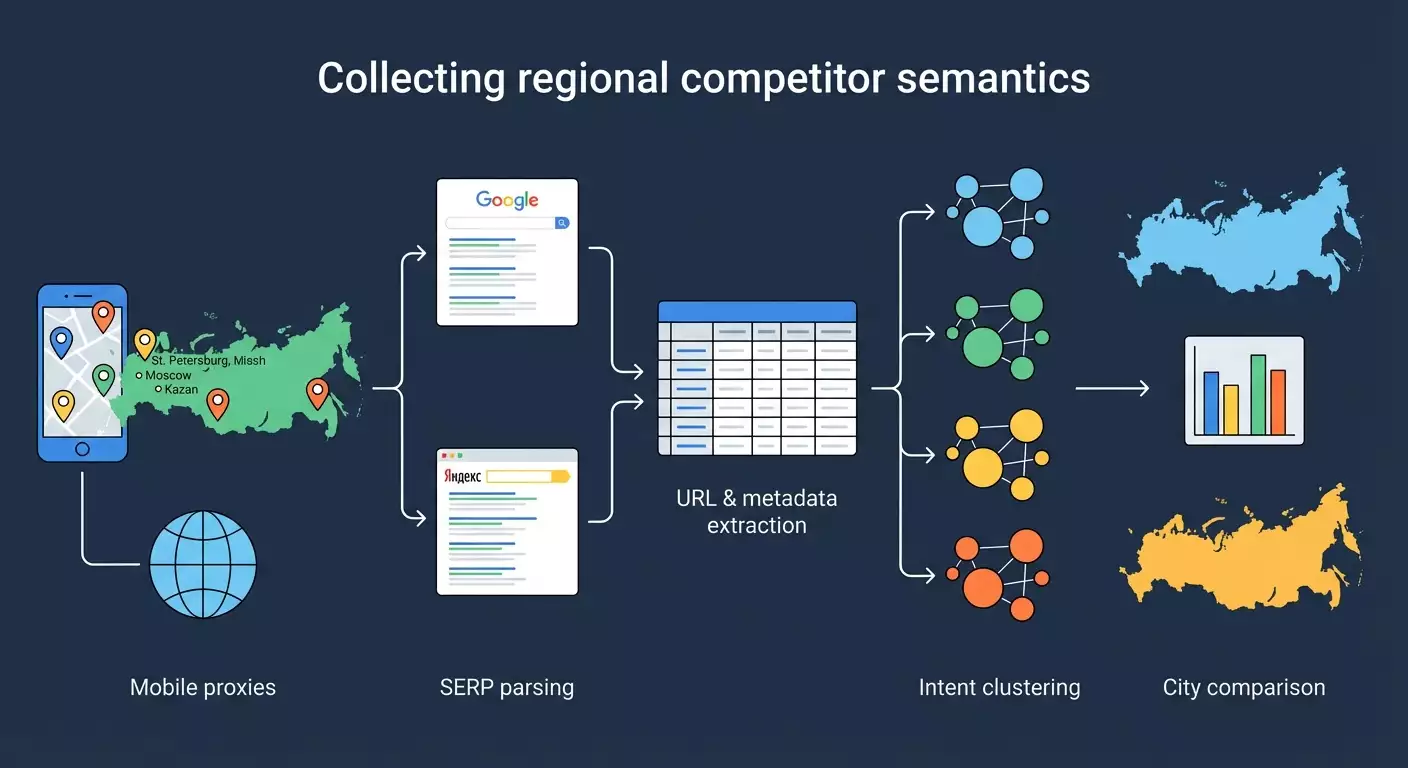
Table of contents
- Introduction
- Preliminary preparation
- Basic concepts
- Step 1: identify target queries and list of regions
- Step 2: set up mobile proxies by city and confirm geo
- Step 3: prepare the python environment and project structure
- Step 4: compile a list of direct competitors by region
- Step 5: parse top-50 results by queries and cities (google and yandex)
- Step 6: cleaning, normalizing, and extracting domains
- Step 7: cluster the collected semantics by intent
- Step 8: combine data and prepare analytical cuts
- Step 9: analyze differences in results by regions and query localization
- Result verification
- Common mistakes and solutions
- Additional opportunities
- Faq
- Conclusion
Introduction
In this step-by-step guide, you will learn how to build a semantic core of competitors in different regions of Russia using mobile proxies, parsing search results from Google and Yandex, as well as tools for grouping and analysis. We will cover everything from scratch: environment preparation, proxy configuration by city, parsing top 50 results for target queries, extracting URLs, titles, descriptions, positions, intent clustering of collected semantics (informational, commercial, navigational), comparing search results by regions and preparing a practical report for SEO decisions.
In the end, you will receive: 1) a list of competitors for each city, 2) a table of keywords for which competitors rank in different regions, 3) metrics on regional search differences and query localization, 4) grouped intent clusters to save budget and prioritize content, 5) a repeatable pipeline that can be executed monthly.
This guide is suitable for SEO specialists, internet marketers, analysts, and anyone who wants to understand how regional search results work and quickly extract useful data for decision-making. Level of difficulty — beginner with elements for advanced users. We won't require deep programming skills, but minimal work with Python will be helpful.
What you need to know in advance: basic understanding of SEO, how snippets are formed, the difference between informational and commercial queries, how to work with CSV/Excel. How much time will it take: with prepared queries and city lists — 6–10 hours for the first run, 1–3 hours for subsequent iterations.
✅ Verification: You understand that you will get a specific list of competitors by cities, general and unique semantics, and will be able to explain which queries are localized and how to use that in regional SEO.
Preliminary Preparation
Required tools: 1) An account and access to mobile proxies on mobileproxy.space with Russian cities (Moscow, St. Petersburg, Yekaterinburg, Novosibirsk, Kazan, and others as per your task). 2) Python 3.10+ and pip package manager. 3) Python libraries: requests, beautifulsoup4, lxml, pandas, urllib3, tldextract (for domain extraction). 4) Text editor (VS Code or similar). 5) Spreadsheet editor (Excel, Google Sheets, or LibreOffice Calc). 6) Key Collector on Windows for grouping and clustering queries. 7) Terminal or command line. 8) Optionally: curl for quick proxy checks. 9) Access to a browser for geo-check via Yandex.Internetometer (a Yandex service for IP geolocation verification).
System requirements: Windows 10/11 or macOS 12+ or Linux (Ubuntu 22.04+), at least 8GB RAM, stable internet 10Mbps+, 2–5GB of free disk space for data and logs.
What to install: 1) Install the latest stable version of Python. 2) Install Key Collector on Windows. 3) Create an account on mobileproxy.space, top up your balance, and purchase proxies for the needed cities (1 proxy per city, preferably 2–3 to distribute the load). 4) Install libraries: run in the terminal: pip install requests beautifulsoup4 lxml pandas urllib3 tldextract. 5) Configure the text editor and terminal.
Creating backups: create a project folder with subfolders data/raw, data/clean, reports, config, logs, and periodically back up CSV files to a backup folder or cloud.
⚠️ Attention: Ensure that your actions comply with the laws and service rules. Some search engines limit automated data collection. Use a reasonable query limit, read robots.txt, comply with rules, and consider official APIs as the preferred method.
Tip: Create a Python virtual environment (python -m venv .venv and then activate it) and pin dependencies in requirements.txt for easy project transfer.
✅ Verification: The terminal commands python --version and pip --version work, libraries are installed without errors, you have access to at least one proxy for Moscow, and you can open Yandex.Internetometer in the browser.
Basic Concepts
Key terms in simple language: 1) Semantic core — a list of search queries for which you want to rank or analyze competitors. 2) Regional search results — search results shaped by the user's location (city, region). 3) Mobile proxies — proxy servers based on mobile operators that allow simulation of traffic from real mobile IP addresses and, importantly for our case, selecting the city. 4) SERP parsing — extracting data from the search results page (URLs, titles, snippets, position). 5) Intent — the assumed goal of the user: informational (to learn), commercial (to buy/order), navigational (to find a specific site). 6) Top-50 — the first 50 organic results, excluding ads.
Basic operational principles: we send a query to the search engine, specify a proxy to fix the geo, receive the HTML page, extract the required elements, and save them to a table. We repeat this for each city and each query. Then we group and analyze.
What’s important to understand: 1) The set of domains and pages in the top can vary across different cities. 2) Localized queries often contain city names or imply a local intent (for example, delivery, nearby, address). 3) Too frequent queries without pauses may trigger a CAPTCHA or block. 4) Proper geo-checking is critical. 5) Some results may be personalized; use clean sessions without authorization.
Tip: When analyzing, focus not only on keywords but also on competitor domains and content type to choose the right strategy (local pages, catalogs, articles, landing pages).
Step 1: Identify Target Queries and List of Regions
Objective of the Stage
To form an initial list of queries and a list of cities for which we will collect search results. This serves as the base for parsing and comparison.
Step-by-Step Instructions
- Open a spreadsheet (Excel or Google Sheets) and create a sheet called Seeds.
- In column A, list the basic queries that reflect your product or niche. For example: “water delivery,” “laptop repair,” “buy furniture,” etc.
- In column B, add clarifications or synonyms if they are important. For example: “drinking water,” “MacBook repair,” “wardrobe cabinet.”
- Create a sheet called Cities. In column A, list the cities: Moscow, St. Petersburg, Yekaterinburg, Novosibirsk, Kazan, Nizhny Novgorod, Samara, Chelyabinsk, Omsk, Rostov-on-Don, Ufa, Krasnoyarsk, and other target regions.
- Determine your priorities: highlight 10-15 key cities with the highest demand.
- Formulate a list of target queries by combining basic and clarifying phrases. For example: “water delivery,” “home water delivery,” “drinking water delivery,” “laptop repair,” “urgent laptop repair.”
- Save the spreadsheet in the data/raw folder as seeds_and_cities.xlsx.
Important Points: Do not add city names to queries yet to assess localization without explicit geo modifiers. You will check those later.
Tip: Limit your list to 50–200 queries for the first run to avoid overloading the proxies and wasting extra time.
✅ Verification: You have one file with 50–200 queries and 10–15 cities. The queries are clear and align with business objectives.
Potential problems and solutions: if it’s hard to form a list, take data from your site’s internal search prompts, chats with clients, service lists, and product categories. Then expand suggestions through search manually.
Step 2: Set Up Mobile Proxies by City and Confirm Geo
Objective of the Stage
Connect mobile proxies from mobileproxy.space for each city, verify that the IP genuinely corresponds to the intended city using Yandex.Internetometer.
Step-by-Step Instructions
- Log in to your account on mobileproxy.space. Choose a plan that allows you to select a city and operator. Take at least one proxy for each city on your list. Ideally, 2-3 proxies per city.
- Record for each proxy: host, port, username, and password. For example: proxy.example.host:12345, user:pass.
- If link or API rotation is supported, save the link for IP changing. This will be useful for resetting sessions in case of CAPTCHA.
- Create a file config/proxies.csv with columns city, host, port, user, password, rotation_url (if any) and fill it in.
- Open a browser, enable the system or browser proxy for Moscow, and visit Yandex’s IP and geolocation checking service (Yandex.Internetometer). Ensure that the city is identified as Moscow.
- Repeat the check for St. Petersburg, Yekaterinburg, and other cities by changing proxy settings.
- Disable the proxy in the browser. In the future, we will conduct geo-checking programmatically.
⚠️ Attention: Use proxies only in accordance with the service conditions and the law. The purpose of proxies is to accurately fix geo and evenly distribute load, not to bypass restrictions.
Tip: Set a simple timeout: after changing the proxy, wait 10-20 seconds before checking geo to avoid “caches” or network delays.
✅ Verification: For each city, you can enable the corresponding proxy and see the correct city in Yandex.Internetometer.
Problems and solutions: if the city is misidentified, change the IP through rotation, select a different operator in the same city or contact support. If the browser ignores the proxy, check the settings and authorization.
Step 3: Prepare the Python Environment and Project Structure
Objective of the Stage
To create a stable environment for parsing and analysis: directory structure, dependencies, and connectivity test via proxy.
Step-by-Step Instructions
- Create a project folder, for example regional-serp-competitors.
- Inside, create subfolders: config, data/raw, data/clean, logs, reports, scripts.
- Create a virtual environment: in the terminal run “python -m venv .venv” and activate it (Windows: “.venv\Scripts\activate”, macOS/Linux: “source .venv/bin/activate”).
- Install dependencies: “pip install requests beautifulsoup4 lxml pandas urllib3 tldextract”.
- Create a file config/settings.yaml. Add the basic parameters: timeouts, delays (for example delay_min: 3, delay_max: 8), maximum retry attempts (retries: 3), user-agent.
- Create a script scripts/test_proxy_geo.py that will load the Yandex.Internetometer page through one of the proxies and print out the city identified in the HTML.
- In the script, set the proxy as a dictionary of the format: {"http": "http://user:pass@host:port", "https": "http://user:pass@host:port"} and make a requests.get to the IP verification page, then find in the HTML a node with the city (by text “City” or a similar element).
- Run the script for several cities and make sure that the output matches the expected results.
Tip: Set a single User-Agent, such as “Mozilla/5.0 (Windows NT 10.0; Win64; x64) AppleWebKit/537.36 (KHTML, like Gecko) Chrome/121.0 Safari/537.36,” and change it every 20–50 requests if necessary.
✅ Verification: The script test_proxy_geo.py correctly outputs different cities when changing proxies. There are no persistent timeouts or authorization errors in the logs.
Problems and solutions: if requests return 407 Proxy Authentication Required, check the username and password, escape characters. If you receive a CAPTCHA, increase the delay and include IP rotation less frequently and smoothly.
Step 4: Compile a List of Direct Competitors by Region
Objective of the Stage
Identify competitor domains in each city to monitor their rankings and collect semantics later.
Step-by-Step Instructions
- Select 5-10 key queries from your list that accurately reflect the target service or product without geo clarifications.
- Create a script scripts/collect_competitors.py. For each city, take the corresponding proxy. For each of the selected queries, sequentially send a search to Yandex and Google.
- For Yandex, use query parameters that consider language and region. For example, add lr (region code) if you know it; otherwise, rely on proxy geo.
- For Google, set parameters hl=ru, gl=ru. Geo will be determined by IP; additional tests can be performed with safe search parameters.
- Extract the first 20-30 organic results. Skip ad blocks, services, and prompts if they are not relevant to goals.
- Normalize domains using tldextract. Save for each city the frequency of domains: domain, how many times it appears in the top, and which queries.
- Compile a table data/raw/competitors_by_city.csv with columns city, domain, engine, frequency, queries.
Important Points: Personalized services (maps, marketplaces) may dominate. Keep them if they are real competitors in SERP. If you are B2B, filter out news aggregators.
Tip: Additionally, create a “manual check” for 1-2 queries in each city in your browser under the corresponding proxy and compare domains with the script’s results. This will increase confidence in parsing accuracy.
✅ Verification: For each city, there is a list of 10-30 domains with frequency indicated. Local sites and federal players are present in the top. The data from the script is close to a manual check.
Problems and solutions: discrepancies with manual checks may arise from the dynamics of search results, personalization, or improper filtering of ad blocks. Increase delays, use clean sessions, and employ checks.
Step 5: Parse Top-50 Results by Queries and Cities (Google and Yandex)
Objective of the Stage
Collect a detailed results table: URL, title, description, position, search engine, city, query.
Step-by-Step Instructions
- Create a script scripts/serp_scraper.py. Structure it: functions for querying Yandex and Google, a function for parsing HTML, saving rows to CSV.
- Create a config file with parameters: number of results per_city_per_query_limit: 50, delays delay_min, delay_max, maximum retries: 3, list of User-Agent strings.
- Formulate search URL. Example Google: “https://www.google.com/search?q=query&num=50&hl=ru&gl=ru&pws=0”. Example Yandex: “https://yandex.ru/search/?text=query&lr=region_code&numdoc=50,” if lr is unknown, rely on IP geo.
- Set proxies by city. Proxy dictionary: {"http": "http://user:pass@host:port", "https": "http://user:pass@host:port"}.
- Request the page with a timeout of 20-30 seconds. Handle errors: timeout, 429, 5xx. In case of errors, pause for 30-60 seconds and retry with the same proxy.
- Parsing Google: find the result containers: blocks with h3 tags for titles and links, snippets in adjacent div/span. Exclude links to cache, images, videos, ads. If the structure differs, use all found “a” tags with a visible title within the result blocks and filter by domains.
- Parsing Yandex: look for organic result cards. Extract “a” tags with result links, titles, and hints. Exclude prompts (maps, directories) if they are not part of the analysis; otherwise, tag them as type=feature.
- Number the positions from 1 to 50 in the order results appear. For Yandex and Google results, the position is counted among organic cards.
- Save rows with columns: engine, city, query, position, url, title, snippet, fetched_at (date/time), proxy_id.
- Run the collection by city sequentially. For each city, iterate through all queries. Between queries, make a 3-8 seconds delay; between cities, 10-20 seconds.
- Save data in data/raw/serp_results.csv. Also, duplicate an hourly copy with a date prefix in the backup folder.
⚠️ Attention: Some search engines do not allow automated scraping. Consider using the official API (e.g., Google Custom Search API) or specialized services. If you do scrape HTML, do so conservatively and minimally, only for analytical purposes, respecting limits.
Tip: Spread scraping early in the morning or late in the evening when load is lower. Random pauses and alternating User-Agent reduce the likelihood of CAPTCHA.
✅ Verification: The final CSV should have records for each city and query, with 50 results for each combination. Fields are filled, URLs are correct, and positions are in order.
Problems and solutions: if you encounter a CAPTCHA, increase pauses, reduce simultaneous requests, and use IP rotation no more than once every 2-5 minutes. If the HTML structure changes, update the selectors and expedite manual checks for 2-3 queries.
Step 6: Cleaning, Normalizing, and Extracting Domains
Objective of the Stage
Prepare data for analysis: remove junk, normalize URLs, extract domains, and exclude irrelevant elements.
Step-by-Step Instructions
- Load the CSV in pandas (script scripts/clean_results.py). Check for empty titles/snippets and restore them from alternative HTML nodes if necessary.
- Filter duplicate rows by (engine, city, query, url). Keep the first occurrence.
- Exclude internal links of search engines, redirects to caches, links to maps or news if they are not needed. Add a flag type=organic for clean organic results.
- Normalize URLs: remove anchors, convert schema to https, eliminate tracking parameters (utm_*, gclid, etc.). Save the cleaned URL in a separate column clean_url.
- Using tldextract, obtain the second-level domain and zone. Save in the column root_domain, e.g., “site.ru.”
- Save the cleaned file in data/clean/serp_results_clean.csv.
Tip: Immediately add a column is_local_feature for results such as maps/directories/marketplaces so you can quickly separate them from regular pages in analysis.
✅ Verification: The number of rows decreased due to the removal of duplicates and junk, domains are extracted correctly, and there are no service links. You can count unique root_domain by city and query.
Problems and solutions: if too many results are flagged as junk, check filters and refine rules. Sometimes it’s beneficial to keep large aggregators for completeness.
Step 7: Cluster the Collected Semantics by Intent
Objective of the Stage
To group key phrases into clusters by intents and thematic clusters to understand what type of content and pages are needed for regional promotion.
Step-by-Step Instructions
- Formulate a list of unique queries from the parsing data: take the query column and remove duplicates. Save it in data/clean/unique_queries.csv.
- Open Key Collector on Windows and create a new project: File → New Project. Name the project, for example, “Regional SERP Competitors.”
- Import the list of queries: Import menu → From file → select unique_queries.csv. Ensure it is UTF-8 encoded.
- Create thematic groups. In Key Collector, use clustering tools by morphology or by common words. Start with moderate thresholds for similarity (e.g., 3 common terms), then adjust the groups manually.
- Label each group by intent: informational, commercial, navigational. You can create a custom field for this. Examples: informational — “how to choose,” “what is”; commercial — “price,” “buy,” “order”; navigational — “brand,” “official site.”
- Export the result to CSV with columns: query, cluster, intent. Save it in data/clean/queries_clustered.csv.
Tip: If you don’t have Key Collector, create a simple heuristic in pandas: create a token list for each intent and classify the query by the presence of those words. Then manually review disputed cases.
✅ Verification: Each query has a cluster and intent. Most commercial queries are logically grouped, and informational ones are separated from transactional.
Problems and solutions: if groups are too broad, lower similarity thresholds. If too narrow, raise thresholds or combine manually. In complex topics, a hybrid approach can be beneficial: automatic primary clustering + manual fine-tuning.
Step 8: Combine Data and Prepare Analytical Cuts
Objective of the Stage
To merge SERP results with clustering, calculate useful metrics for comparative analysis across regions and competing domains.
Step-by-Step Instructions
- Load data/clean/serp_results_clean.csv and data/clean/queries_clustered.csv into pandas (script scripts/analyze_regions.py).
- Do a merge on the query column so that each result receives a cluster and intent.
- Add domain position calculation: for each combination of city + query, create rankings. This is already in position; ensure its correctness.
- Calculate the share of domains by clusters: group by city, cluster, root_domain, metric average position, and share in the top-10.
- Add a top-10 flag: position ≤ 10. Calculate domain coverage in the top-10 by clusters and intents.
- Save intermediate tables in data/clean/analytics_*.csv, e.g., coverage_by_city_domain.csv, top10_share_by_intent.csv.
Tip: It’s convenient to show “heat maps” of coverage in the report: cities horizontally, domains vertically, color — share of requests in the top-10. This identifies strong players by regions.
✅ Verification: Tables are created without errors, with understandable figures: local players show higher top-10 shares in their city, while federal ones maintain a steady share across many cities.
Problems and solutions: if there are few hits in the top-50, check the correctness of parsing and filters. Expand the query list or increase the result limit to 100 if permitted and safe.
Step 9: Analyze Differences in Results by Regions and Query Localization
Objective of the Stage
To determine which queries are localized and which are not, and how this affects SEO strategies in different cities. Identify clusters and domains with strong locality.
Step-by-Step Instructions
- For each query, gather sets of domains in the top-10 by cities. Count intersections between cities (e.g., Moscow vs St. Petersburg). Metric: Jaccard = |intersection| / |union|.
- Build a pivot table of Jaccard for all city pairs. Low values indicate a strong regional dependence of the results.
- Identify localized queries: those for which the average Jaccard across all city pairs is below the threshold (e.g., 0.3). For non-localized — the threshold is above (e.g., 0.6).
- Compare intents: typically, commercial queries are more often localized than informational ones. Check this by average Jaccard values within each intent.
- Identify “unique” competitors by city: domains that appear in the top-10 only in one city. Prepare a list for local backlinks and partnerships.
- Prepare a report: 1) Top localized queries, 2) Top non-localized queries, 3) Domains unique to the city, 4) Domains that are consistently strong in several cities.
- Save the report in reports/regional_differences.csv and create a textual summary with recommendations.
Tip: Add a metric for “position stability” for domains: average and standard deviation of position across cities. This helps to understand where the domain is stronger.
✅ Verification: The reports show that some queries vary significantly between cities, while others remain nearly unchanged. You can name at least 5 localized and 5 non-localized queries from your sample.
Problems and solutions: if the difference is minimal, the topic may be less dependent on the region or the sample is too narrow. Add requests with local intent (“nearby,” “delivery today,” “in my city”) and repeat the analysis.
Result Verification
Checklist: 1) You have working mobile proxies for 10+ cities, geo verified. 2) The parser collects top-50 for each city and query; CSVs are not empty. 3) Cleaning and normalization have been completed, domains extracted. 4) Intent clustering is finished; each query has an assigned intent. 5) Reports on differences between cities have been prepared. 6) The report includes lists of localized and non-localized queries. 7) Recommendations for regional SEO based on the data are available.
How to test: 1) Compare several queries manually in a browser using the corresponding proxy. 2) Cross-check 5-10 rows of the CSV with real results. 3) Ensure that the top-10 by cities genuinely differ where you expect.
Success metrics: data coverage is no less than 80% of the planned number of combinations city × query; minimal network error count; clear, reproducible reports.
Common Mistakes and Solutions
- Problem: CAPTCHA and blocks. Reason: high query frequency, similar headers, lack of pauses. Solution: increase delays, reduce parallelism, rotate IPs less frequently, change User-Agent, consider official APIs.
- Problem: incorrect geolocation. Reason: proxies with unstable geo or cache. Solution: verify geo using Yandex.Internetometer, change IP, choose another operator or city.
- Problem: junk data and duplicates. Reason: uncleaned URLs, ad blocks. Solution: add filters by domains, normalize URLs, keep only organic results.
- Problem: unstable HTML selectors. Reason: changes in SERP structure. Solution: use more general patterns, test the parser on 2-3 queries, update selectors.
- Problem: too narrow clusters. Reason: high similarity threshold. Solution: lower the threshold, merge close clusters manually, check tokenization.
- Problem: weak regional differentiation. Reason: improper query selection. Solution: add local intents and check Jaccard across city pairs.
- Problem: proxy overload. Reason: too many consecutive requests. Solution: distribute over time, use additional proxies, add queues and pauses.
Additional Opportunities
Advanced settings: 1) Cache HTML responses by key (engine, city, query) to save requests. 2) Store data in SQLite or PostgreSQL with indexes by city, query, domain. 3) Log errors to separate files in logs with timestamps. 4) Add a headless browser (e.g., using Selenium) only for problematic requests where snippets do not get collected without JS. 5) Use official APIs: Google Custom Search API, Yandex.API (if relevant endpoints are available). This reduces risks and improves stability.
Optimization: 1) Randomization of delays and User-Agent. 2) Smart retries: only repeat unsuccessful requests. 3) Separate “heavy” requests into a different queue and process later. 4) Launch weekly or monthly for monitoring dynamics.
What else can be done: 1) Calculate Rank-Biased Overlap between cities for a finer assessment of similarity in search results. 2) Automatic recommendations generation: what pages are useful to create for a specific city. 3) Use a morphological analyzer for the Russian language for improved clustering. 4) Develop a dashboard (e.g., in Power BI) for visualizing domain and intent coverage across cities.
Tip: Include a blacklist of domains that should always be excluded from analysis (e.g., irrelevant services), but keep a copy of the raw data to restore if needed.
FAQ
Question 1: Can I do without mobile proxies? Answer: Yes, if there are official APIs with regional parameters or if you use city data centers. But mobile proxies often better reflect actual local search results.
Question 2: How to reduce the likelihood of CAPTCHA? Answer: Increase delays, reduce parallelism, alternate User-Agent, use IP rotation not too frequently, and whenever possible, use official APIs.
Question 3: How to determine if a query is localized? Answer: If the composition of domains in the top-10 changes significantly between cities (low Jaccard), and localized directories and maps often appear in the results, the query is localized.
Question 4: What to do if the HTML structures of Google and Yandex change? Answer: Keep your parser modular, add auto-tests for 2-3 benchmark queries. Upon changes, update just the parsing module.
Question 5: How to correctly mark intents? Answer: Combine automatic heuristics (token suggestion lists) with manual checks of disputed cases. Refine intents based on conversion data.
Question 6: What if there is little data in the city? Answer: Expand the query list, add LSI lexemes and long tails, run at another time of day, use alternative sources of semantics.
Question 7: How to account for aggregators and marketplaces? Answer: Do not remove them completely. Mark them as a separate type and analyze their impact on your niche. They are competitors for traffic.
Question 8: Can Google and Yandex data be combined? Answer: Yes. In reports, keep an engine label. Compare them separately and together to see cross-search resilience of domains.
Question 9: How often to update data? Once every 2–4 weeks for dynamic niches, once every 1–2 months for stable ones. Keep report versions to track trends.
Question 10: What metrics are the most useful? Top-10 share by domains and clusters, average position, position stability, Jaccard between cities, intent coverage.
Conclusion
Summary of actions taken: you prepared proxies by cities, verified geo, set up the Python environment, collected top-50 results in Google and Yandex for selected queries and regions, cleaned and normalized data, clustered semantics by intents, and conducted an analysis of differences in results between cities. As a result, you have a practically applicable report that shows which queries competitors excel in each region and which queries are localized.
Next Steps: 1) Create and optimize local landing pages for localized clusters with commercial intent. 2) Strengthen E-E-A-T signals in cities where positions are unstable. 3) Set up regular data collection and monitor changes. 4) Adapt content to the information sought after in specific cities.
Areas for growth: 1) Integrate with CRM to evaluate conversions by regions. 2) Add behavioral signals and local backlinks. 3) Expand the number of cities and themes of queries. 4) Automate reporting and visualization in BI tools.
Tip: Document each step and save configurations. This way, your pipeline can be easily scaled to new cities and niches.
Tip: Keep a report template and a launch checklist. This saves 30–40% of time in subsequent iterations.