Ocellaris: Automating Telegram and Lead Generation through Messages
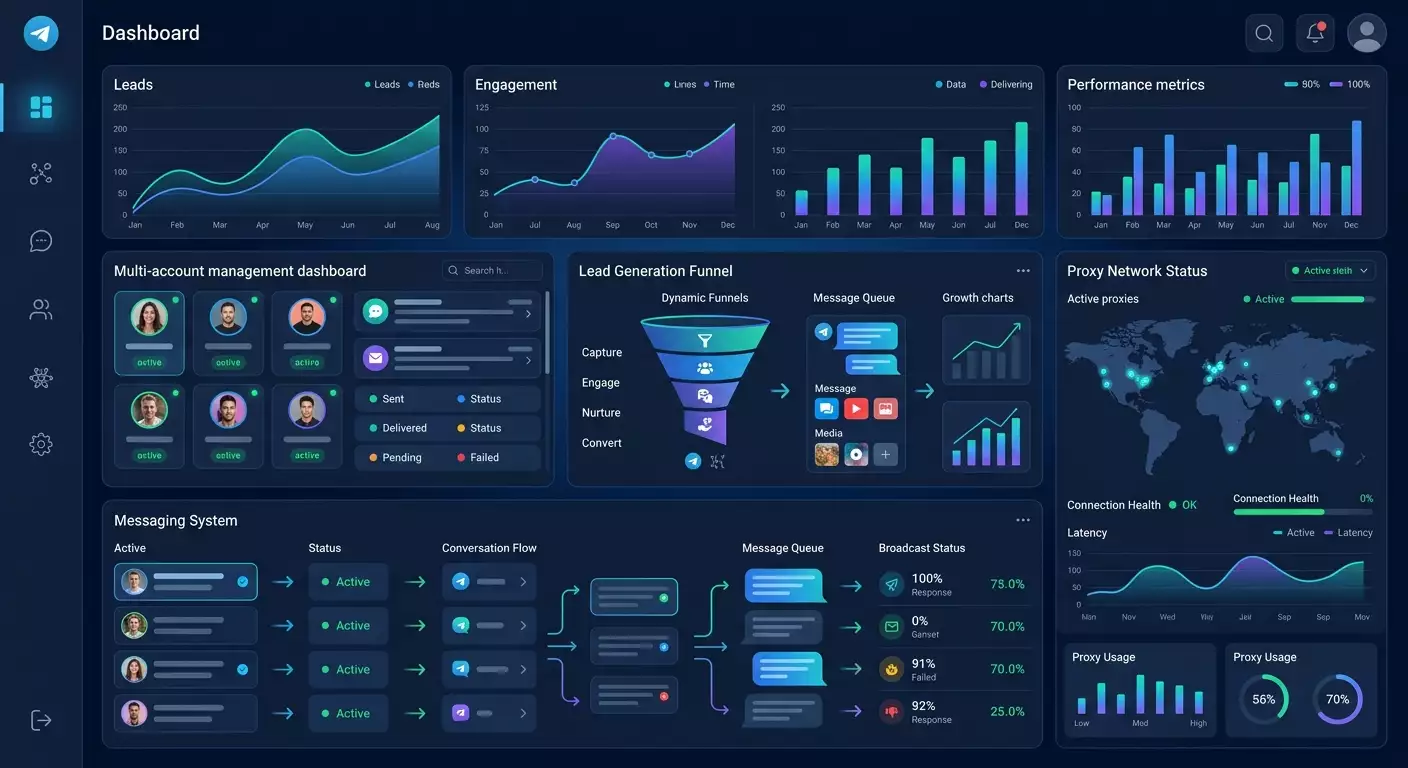
Table of contents
- What is ocellaris and who is it for?
- Key features of ocellaris
- Ocellaris video overview
- Pricing and costs
- Pros and cons of ocellaris
- Practical uses of ocellaris
- Why proxies are necessary for working with ocellaris
- Ocellaris' ideal compatibility with mobile proxies
- Why mobile proxies are better
- Getting started with ocellaris
- Alternatives to ocellaris
- Faq
- Conclusion
Ocellaris is your go-to tool for automating tasks in Telegram, ranging from message broadcasting in chats to smooth communications in direct messages, reactions, and comments. It addresses three common challenges: manual outreach, the unpredictability of lead inflow, and scaling issues. Through multi-accounting, content randomization, and the use of proxies, Ocellaris helps create a manageable and repeatable lead generation process.
Why does Telegram remain a strong source of leads? It boasts high engagement levels, swift feedback, and vibrant communities in all niches, from local businesses to B2B. Well-crafted Telegram messages, comments, and reactions generate organic reach without costly media—provided the communication remains ethical and relevant.
What is Ocellaris and Who is it For?
Ocellaris is a desktop software (Windows) dedicated to automating Telegram processes. It's suitable if you are:
- An Arbitrager—you need to test hypotheses, lead magnets, and offers, gather initial inquiries from Telegram communities, and scale connections.
- A Marketer/Targeting Specialist—you require streamlined outreach, additional contacts for your funnels, and remarketing to warm audiences (like chat participants/channel subscribers).
- A Business Owner—you need to quickly check demand, invite audiences to consultations/webinars, and nurture your base with reactions and responses.
- An Info-Businesser—you need registrations for broadcasts, warm-ups through a series of messages, and improving channel engagement through correct reactions and comments.
- An Agency—you need to manage multiple projects with different accounts and proxies, separating risks and metrics.
Key Features of Ocellaris
Automated Messaging in Chats
Select thematic groups, set the content and schedule, and Ocellaris will publish messages from your accounts. For safety, it’s crucial to adhere to chat rules and publish relevant materials to avoid complaints.
Direct Messaging
Targeted communication allows for warm outreach: respond to inquiries from chats, answer user questions, and accompany your lead magnet. Key point: contact those who have shown interest and given a reason to reach out, rather than mass messaging without permission.
Commenting on Posts
Comments on channel and chat posts are a straightforward way to highlight offers, answer questions, and drive traffic to your profile/bot/landing page. It’s important to provide value on-topic and not overdo the promotions.
User Tagging
Tag users in discussions where it's appropriate and valuable to the context. A tag is a precise attention draw that works only with a clear script and genuine message value.
Post Reactions
Reactions enhance visibility of activities and warm up the audience before personal contact. A careful tactic: first react to a relevant post, then send a personalized message on the topic.
Proxy Use and IP Rotation
Ocellaris supports proxies, which are important for separating accounts, reducing IP overlaps, and careful rotation during mass actions. This minimizes technical risks and distinguishes projects.
Message and Image Randomization
Templates with synonyms, variables, random media, and structural variations reduce repeatability, making communication more natural and lowering the chance of moderation triggers.
Multi-Account Support
Support for a package of accounts for parallel work: flexible task scheduling, logging, and content segregation for different niches and geographies.
Ocellaris Video Overview
Watch the Ocellaris video overview on YouTube
Pricing and Costs
- 7-day trial — $7.
- Lifetime license — $50.
Conditions and current costs may change over time. The entry barrier is low, allowing you to validate hypotheses without major investments.
Pros and Cons of Ocellaris
- Pros:
- Simplified automation of frequent tasks: messaging, reactions, comments.
- Multi-accounting and proxy support—convenient for agencies and arbitraging.
- Flexible content and script randomization.
- Affordable price and trial period.
- Cons:
- Requires discipline and scripts to avoid breaking rules and attracting complaints.
- Basic understanding of proxies and account management is necessary.
- Windows environment: an additional layer (like virtualization) is needed for macOS/Linux.
Practical Uses of Ocellaris
Client Acquisition through Telegram
Post valuable messages in targeted chats, respond, and offer personal pitches to those who asked questions or shown interest. For example: a targeting agency shares a mini-case study in a contextual advertising chat, gathers "warm" dialogues, and schedules free consultations.
Mass Messaging
Sequential posting in relevant chats with varied text and visuals: webinar announcements, product launches, and time-limited offers. The key is relevance and permissible platforms (chat rules, “self-promotion” categories, agreements with admins).
Lead Generation
Combine reactions + comments + direct messages. First, react to a news piece, then ask a clarifying question in comments, and only after that—a valuable offer in direct messages (like an audit, checklist, demo). An additional flow of leads can be generated via a bot/form pinned in messages.
Service and Product Promotion
Alerts about promotions, case studies, and novelties, and invitations to a closed community. For e-commerce, a combination works: product review in a thematic chat + UGC content + personal consultations in DMs regarding size/specifications.
Traffic Arbitrage
Test combinations on the Telegram audience: rapidly gather signals about demand, A/B test texts and creatives, and assess CPL for “warm” inquiries. It's essential to choose niches where Telegram truly is a decision-making point, and follow platform rules.
Scaling Connections
When the basic combination (offer + content + platforms) is found, Ocellaris helps systematically expand reach: more relevant chats, more accounts for different audience segments, scheduling actions, proxy rotation, and careful randomization.
Why Proxies are Necessary for Working with Ocellaris
Telegram imposes restrictions on account activities, and mass identical actions increase the risk of complaints and temporary blocks. Proxies help:
- Separate Projects—each account has its own IP pool, avoiding unnecessary overlaps.
- Reduce Technical Risks—careful IP rotation and stable sessions.
- Work with Multi-Accounts—scale without "gluing" due to network identifiers.
- Geo-Targeting—adjust IPs for specific countries/regions.
Important: proxies are not a way to "cheat" the rules. They are necessary for accurate infrastructure and task separation. Follow laws and platform policies, do not send spam, and do not contact those who are not waiting for contact.
Ocellaris' Ideal Compatibility with Mobile Proxies
For mass scenarios, mobile proxies are the best fit. They provide:
- Stable Operation during Series Actions—fewer interruptions, correct sessions.
- Safe Multi-Accounting—IPs resemble real users of mobile networks.
- Reduced Risk of Restrictions—lower frequency of “red flags” due to the nature of mobile IP pools.
- Proper IP Rotation—flexible address changes as required by the process.
This practically looks like: you set up accounts in Ocellaris, assign a mobile proxy to each, plan the schedule and randomization scenarios. For stable operation and support of needed geos, we recommend the trusted mobile proxy service MobileProxy.space—this infrastructure makes it easy to maintain messaging pace without mixing projects.
Why Mobile Proxies are Better
- Real IPs from Mobile Operators—traffic appears as regular activity of real users.
- High Trust Level from Platforms—mobile IP pools are often less toxic than cheap datacenter IPs.
- Dynamic IP Rotation—flexible changes help maintain session “cleanliness” and reduce technical risks.
- Bypass “Strict” Network Restrictions—this is not about rule violations but about maintaining a correct technical environment where one IP does not host dozens of accounts from different clients.
Getting Started with Ocellaris
Below is a general, safe action plan. Respect Telegram laws and rules. Communicate with relevant and expecting audiences (opt-in, agreements in chats, transparent placement rules).
- 1) Installation (Windows)
- Download the installer from the developer's official source.
- Install the software and log in. Check for updates.
- 2) Adding Accounts
- Use your own/client accounts with verified numbers and a basic activity history.
- Keep backup codes, secure logins with 2FA, and do not mix work and personal profiles.
- 3) Setting Up Proxies
- Connect mobile proxies: 1 account — 1 proxy (recommended for risk segregation).
- Set IP rotation if necessary for the scenario, and test connection stability.
- 4) Content Preparation
- Gather templates with synonyms, media variations, UTM tags, links to your bot/form.
- Ensure content aligns with platform rules: where, when, and what can be published.
- 5) Launching Messages
- Start small: narrow list of chats, clear offer, and moderate schedule.
- Monitor metrics: responses, complaints, conversions. Disable ineffective threads.
- 6) Scaling
- Gradually expand your set of platforms and accounts. Duplicate successful scenarios.
- Automate warm-ups: reactions + comments + personalized messages based on interest.
Alternatives to Ocellaris
- TG Giant—a toolkit for working with Telegram accounts and partial automation. Ideal for messaging and managing multiple profiles. Requires careful setup.
- TgNinja—a framework/tool for messaging and parsing. Flexible, but aimed at experienced users with more manual settings.
- Telethon—a Python library for working with the Telegram API. Maximum flexibility, but requires a developer and your own infrastructure.
- MadelineProto—a PHP client for Telegram. Suitable if your stack is PHP and deep customization is needed. Again, a developer is required.
Compared to low-code or code solutions, Ocellaris offers a quick start "out of the box" without programming. If absolute customization is needed, consider Telethon/MadelineProto, but allocate resources for development.
FAQ
- Are Telegram messages safe?
Relatively safe when respecting laws and platform rules: relevant audience, no spam, moderate tempo, value in messages. Focus on opt-in channels and agreements with admins. - Are proxies needed for working with Ocellaris?
Yes, if you manage multiple accounts, separate client projects, and scale your funnel. Proxies help to segregate infrastructure and maintain stable sessions. We recommend mobile proxies. - How many accounts can I use simultaneously?
Depends on your license, resources, and operational discipline. Practice the scheme 1 account — 1 mobile proxy, gradually increase and monitor quality metrics (responses, complaints, conversions). - How to avoid blocks and complaints?
Communicate purposefully and according to the rules: relevant content, respect for the audience, no mass cold spam, gradual warm-ups, message randomization, correct timing, adequate volume. - Is Ocellaris suitable for beginners?
Yes, the entry barrier is low. But take time to understand the basics: how Telegram chats work, what opt-in is, what formats are permitted, and how to construct valuable messages and which metrics to follow. - Which proxies to choose?
For Telegram automation, mobile proxies are preferable: real IP pool, dynamics, and lower technical risks. Check rates and geos at MobileProxy.space. - Can targeted advertising be fully replaced by messaging?
Not advisable. Telegram messaging is a distinct channel. Often, the best outcome comes from a combination: content channel + community + message broadcasts within rules + targeted outreach.
Conclusion
Ocellaris is a practical automation tool for Telegram, perfect for those looking to systematically generate leads: arbitragers, agencies, marketers, entrepreneurs. The software simplifies messaging, reactions, comments, and multi-accounting, while mobile proxies ensure a stable and separated infrastructure. Start with a trial, build ethical scenarios, and scale connections when metrics confirm demand.
If you need a stable technical foundation for Ocellaris, consider mobile proxies from MobileProxy.space: dedicated channels, flexible IP rotation, and easy management. Launch your first campaign cautiously, test your hypotheses—and gradually turn Telegram into a predictable source of inquiries.